 WagWatch
Logging from your wrist: the WagWatch Apple Watch app
The hardest part of keeping a daily record is not the writing down. It is getting your phone out. WagWatch has an Apple Watch app, it is included with the iPhone app, and it turns "I will log that in a minute" into two taps at the moment it happens — in the garden, on a walk, at the back door, with your phone on the kitchen counter.
It is a companion app rather than a second copy of WagWatch. It does one job, it does it in a couple of seconds, and it does it whether or not your phone is anywhere nearby.
What it looks like
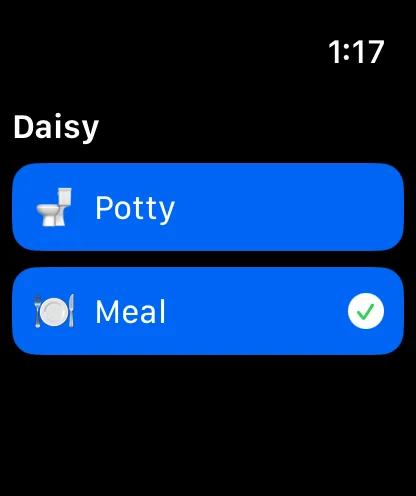
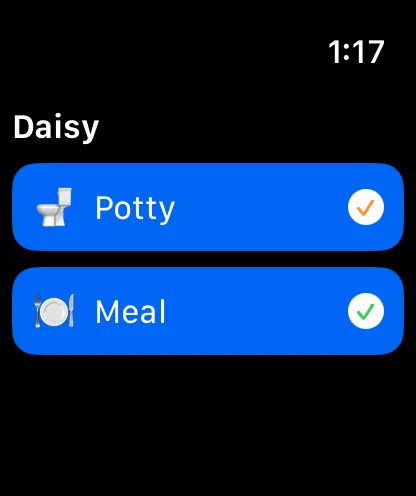
Screens shown are from the current version of the app.
Using it
- Raise your wrist and open WagWatch. The pet you have selected on your phone is already at the top — you do not pick one first.
- Tap Potty or Meal. These are the two entries that happen away from your phone and that are worth recording to the minute.
- Answer one or two short questions. Potty asks whether it was a pee or a poop, where, and whether it was an accident. Meal asks which meal it was and how much was eaten. Each is a screen of big buttons, sized for a thumb and a cold morning.
- Watch the tick. An amber tick means the entry has left the watch. It turns green when your phone confirms the entry is in your pet’s history.
That is the whole interaction. There is nothing to type, no keyboard, no scrolling list. The questions the watch asks are the same ones the phone form asks, with the same answers, because your phone composes them and sends them across — so a cat’s watch offers the litter box where a dog’s offers outside.
Out of range is the point
This is the part people do not expect. Your watch does not need your phone to log something. It does not need Wi-Fi, a cellular plan or a signal of any kind.
A tap on the watch writes one entry and hands it to a delivery queue that lives on the watch itself. If your phone is in the house and you are at the bottom of the garden, the entry waits. If you left your phone on the charger and took the dog round the block, the entry waits. If you close the app, or the watch restarts, the entry still waits. The moment the two devices are back in range of each other it is delivered, in the order you logged it, and it lands in your history with the time you tapped — not the time it happened to sync.
It is the same idea as the offline queue on the phone, one layer further out. Log a walk’s worth of potty breaks with no phone on you, come home, and they are all there in order, with the right times, before you have taken your coat off.
Each entry is stamped with a one-off identifier when you tap. If the hand-off between the devices happens to retry, the second copy is recognised and thrown away — so a flaky connection cannot turn one potty break into two.
Why it is worth having on
- The entries actually get made. A record with the 6am potty break missing every day is not a record of anything. The friction is the whole problem, and two taps at arm’s length removes it.
- The times are real. Logging four hours later means guessing, and guessed times make a useless chart. A watch entry carries the minute you tapped.
- Everyone in the household still sees it. A watch entry is an ordinary entry: it appears in the shared history for whoever else logs for the same pet, on their own phone or in a browser.
- It feeds the same charts. Potty entries logged from the wrist are in the weekly lines and the trend line like any other, which matters if you are trying to show a vet that something changed.
- It is free. The watch app is part of the iPhone app and works on the free plan.
Setting it up
If WagWatch is on your iPhone and your watch is set to install apps automatically, it is already there — look for it in your watch’s app list. If not, open the Watch app on your iPhone, scroll to Available Apps, and tap Install next to WagWatch.
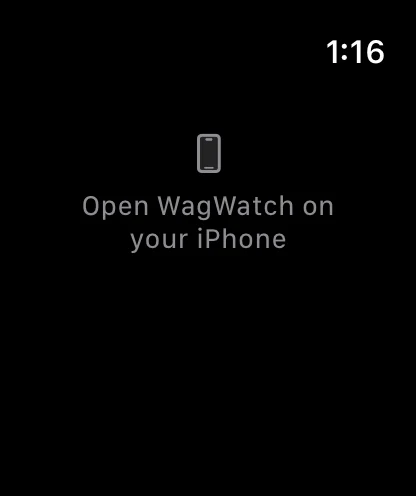
Then open WagWatch on the iPhone once. That first launch is what sends your pet’s name and today’s entries across; until it happens the watch shows the message in the third screenshot above. After that the watch keeps itself up to date, and switching pets on the phone switches the pet on the wrist.
What it deliberately does not do
The watch app has no sign-in, no password and no connection to our servers. It never holds your account. Everything it records travels the few feet to your iPhone and is sent from there, under the session you already trust on that phone.
That is a decision, not a gap. A watch is easier to lose than a phone and harder to wipe, and the only thing worth putting on one is something that cannot be used against you if it goes missing. A single potty entry waiting to be handed over is exactly that.
It is also why the watch shows Potty and Meal rather than every kind of entry. Those are the two that have an honest answer at two taps. Anything that really needs a note, a dose or a photo belongs on a screen big enough to give it one, so those stay on the phone.
Not a substitute for your vet
WagWatch is a tracking and logging tool, not a veterinary service. Its job is to help you bring a clear, accurate history to the people who care for your pet professionally.
Try it tomorrow morning
Log the first potty break of the day from your wrist, before the phone comes off the charger, and see it waiting in the app when it does. The help pages cover logging in detail, shared households explains how other people’s entries join yours, and the release notes list everything that has changed.


Free to use every day. Premium unlocks the full history, every pet and the AI assistant — $3.99 a month or $24.99 a year, 14-day free trial.