 WagWatch
The Home Screen widget, and why a tap opens the form instead of logging for you
The WagWatch widget puts your pet’s quick-log tiles on the Home Screen of your iPhone or Android phone: Behavior, Potty and Meals, or one tile of your choosing. Tap one and WagWatch opens on that entry’s form, with the pet and the kind of entry already chosen. It does not quietly log a default for you, and that is on purpose.
This post covers the sizes, how to pin a widget to a pet, what the check marks mean (and what they cannot know), and why the tap lands in a form.
What it looks like
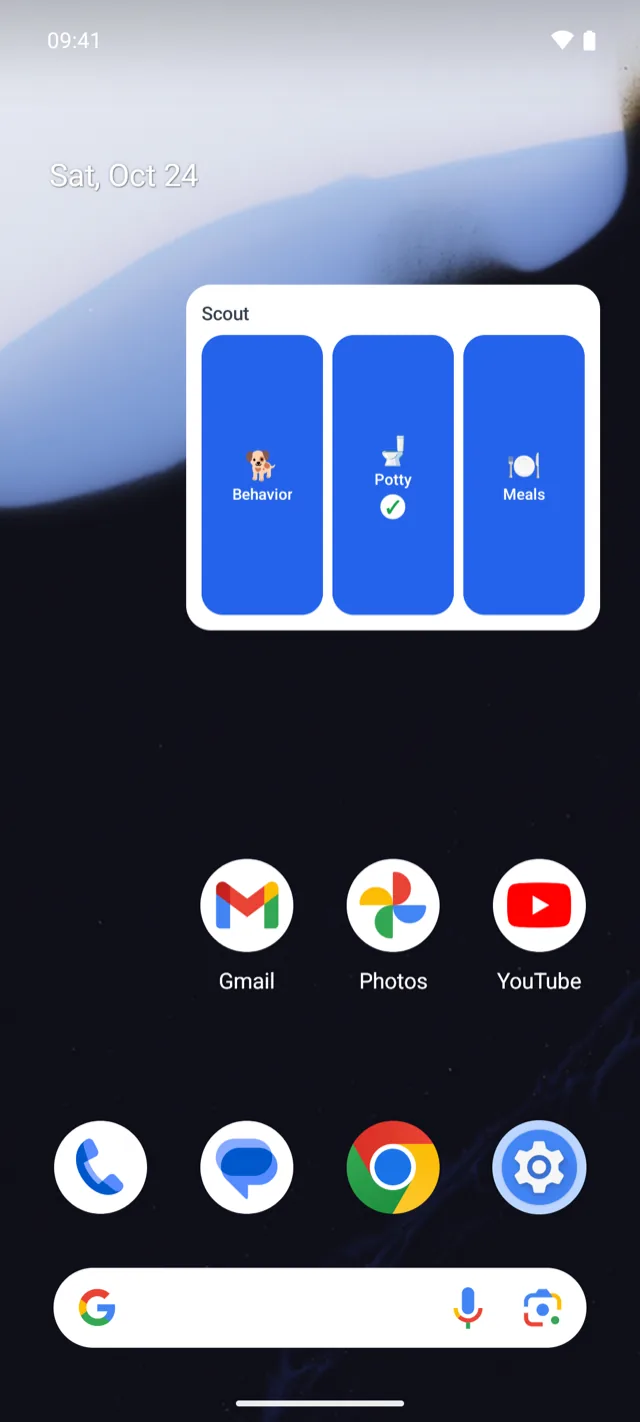
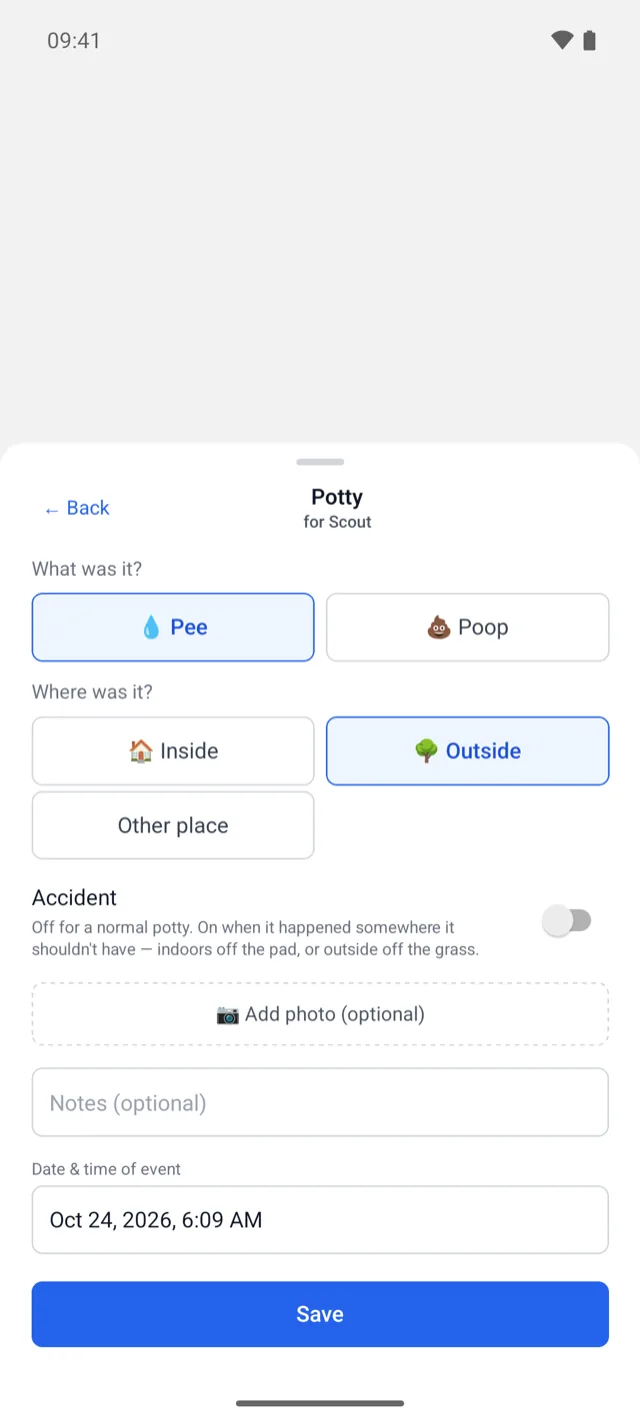
Screens shown are from the Android app, with one of our test pets. The iPhone widget has the same tiles and opens the same forms.
Adding it
Open WagWatch once first, so the widget knows your pets. Then:
- On iPhone, touch and hold an empty spot on the Home Screen until the apps jiggle, tap Edit, then Add Widget (on iOS 17, tap the plus button instead), search for WagWatch and add the widget. The widget needs iOS 17 or later.
- On Android, long-press an empty spot on the home screen, choose Widgets, find WagWatch and drag the widget into place. It asks which pet it is for, then what to show when it is only one tile wide.
There is no widget for the web app: a browser has no Home Screen to put one on.
Sizes, and which pet
| iPhone | Android | |
|---|---|---|
| Three tiles | The medium size: the pet’s name over Behavior, Potty and Meals | The widget at its wider sizes: the same name and the same three tiles |
| One tile | The small size: Behavior, unless you choose another kind — medications included — under Edit Widget | Narrow: the one tile you chose when you placed it; drag it wider for three |
| Which pet | Long-press, Edit Widget, and pick the pet; left unset, it follows the pet selected in the app | Chosen when you place it: a named pet, or whichever pet the app is showing |
With several pets in the household, place one widget per pet. Tapping the pet’s name on the widget opens the app.
What the check marks mean
A tile shows a check mark once that kind of entry has been logged today for that pet — from this phone. The widget learns about an entry when this phone makes it, so what your partner logs on their own phone does not tick your widget; open the app to see everyone’s entries. The check marks clear at midnight, and each pet keeps its own.
The widget shows the pet’s name, the tiles and those check marks, in the language the app is set to. Nothing from the entries themselves is on your Home Screen.
Why a tap opens the form
A widget could log with no form at all: a tap on Potty could simply save “pee, outside, now”. WagWatch does not, because an entry is only worth keeping when it is right, and the details a default would fill in are the ones worth having:
- Potty is pee or poop, and where, and whether it was an accident — the one detail the weekly accident chart is built on.
- Meals are which meal and how much was eaten. A refused dinner logged as “eaten” is worse than no entry.
- Behavior, medical entries and doses are a choice from a list, a severity, a medication and its dose.
A default that is sometimes wrong needs someone to notice it and fix it later. So the widget does the part it can do well — skip the hunt through the app — and hands you the form with the pet and the kind already chosen. It also keeps every entry on the same path as the app’s own: the same form, the same time you can adjust, the same offline queue when there is no signal.
If it is not updating
- A change can take a moment to appear. Opening the app forces a refresh.
- A widget showing the wrong pet is set to a different one: Edit Widget on iPhone, the widget’s settings on Android.
- No check mark after someone else logged? That is expected: see What the check marks mean.
Questions
Does the widget ever log something by itself?
No. Every tile opens WagWatch on a form, and nothing is saved until you save it.
Is the widget part of Premium?
No, it is on every plan. A second pet, and so a second pet’s widget, needs Premium, which covers every pet in the household.
What about my wrist?
On iPhone, the Apple Watch app logs from the wrist, and keeps what you log while the phone is out of reach until it is back.
Not a substitute for your vet
WagWatch is a tracking and logging tool, not a veterinary service. Its job is to help you bring a clear, accurate history to the people who care for your pet professionally.
Log it in WagWatch
Put the widget next to the apps you open first thing in the morning, and the first potty trip of the day gets logged before it gets forgotten. The help pages cover the widget step by step, and shared households shows how everyone’s entries land in one record. More posts are on the blog.


Free to use every day, the widget included. Premium adds the full history, every pet, the Weekly Review and the AI assistant — $3.99 a month or $24.99 a year, with a 14-day free trial for new subscribers in the iPhone and Android apps.