 WagWatch
Give your pet sitter a pass, not your password
When someone else looks after your pet for a few days, the most useful thing they can do is write down what happened — the meals, the potty breaks, the evening dose — in the same record you keep. A WagWatch temporary pass lets a sitter, walker or trainer do exactly that, from their own account, for the days you choose. They see today’s entries, not your pet’s history, and the pass ends by itself.
Handing them your own sign-in would hand them everything: every entry back to the first one, the photos, your plan and your billing. A household invitation would make them a member, with your pets’ history, until they leave or you remove them. A pass is deliberately much smaller than either, and this post is about exactly how small.
What it looks like
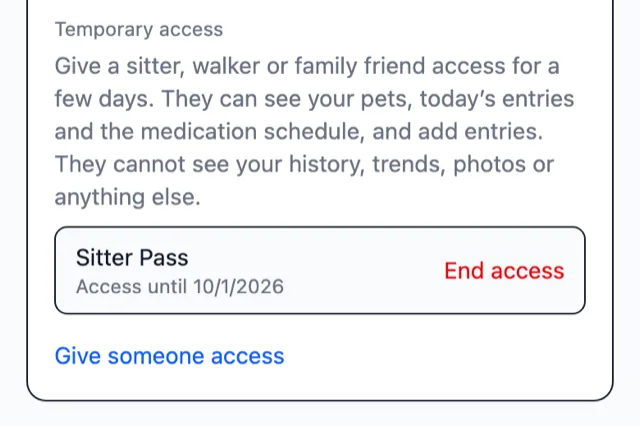
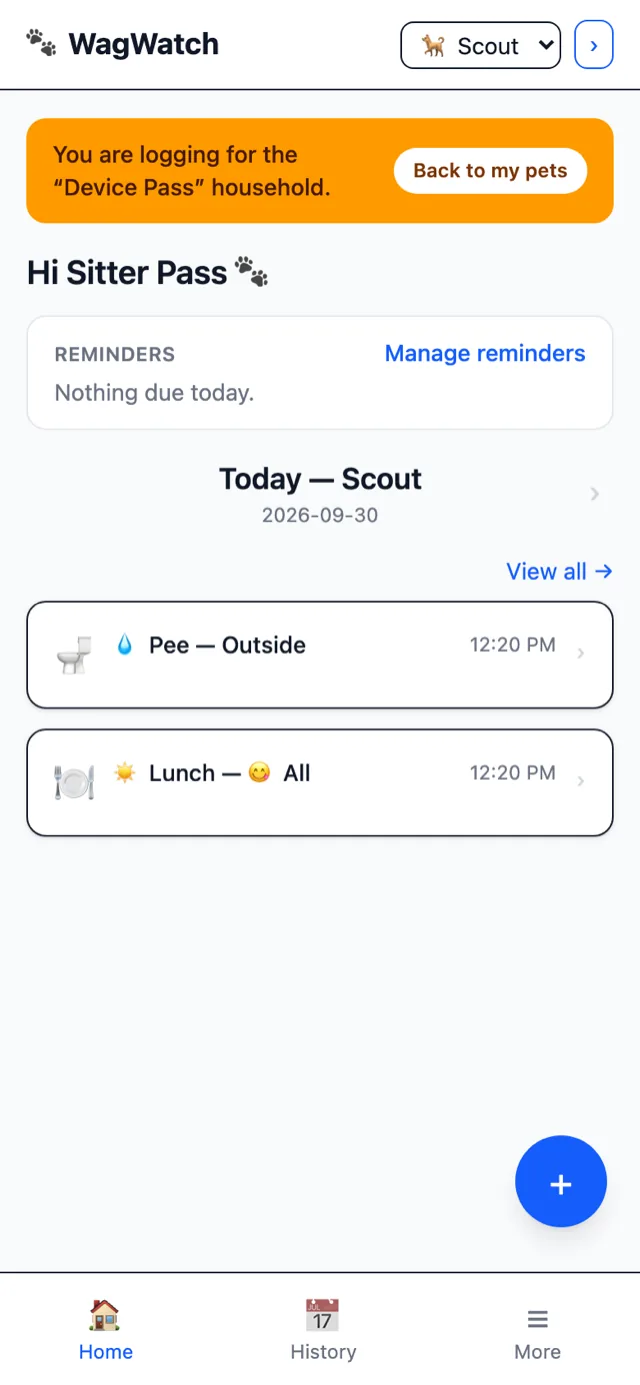
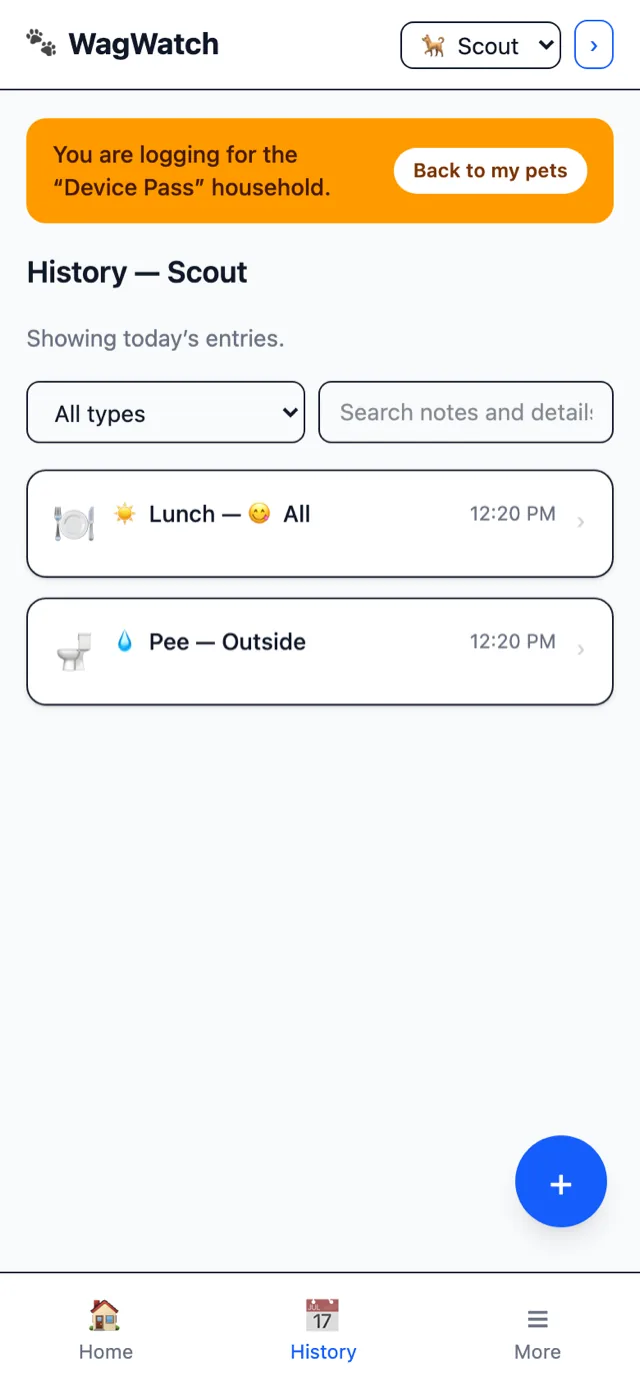
Screens shown are from the web app at phone width, with two of our test households. The iPhone and Android apps show the same section, the same strip and the same History.
Giving one
- Ask them to make a WagWatch account first, if they do not have one. It is free, on an iPhone, an Android phone or the web. A pass belongs to an account, so the account has to exist: if no account uses the address you type, WagWatch says so and gives nothing.
- Open More, then Household, and find Temporary access. Only the household’s owner sees it.
- Tap Give someone access, type the email address they use for WagWatch, and choose how long: 1 day, 3, 7, 14 or 30.
- Tap Give access. That is the whole thing: there is no code to pass on and nothing for them to accept. WagWatch emails them to say whose pets they can log for, how to switch to them, and that the pass ends on its own.
Up to five people can hold a pass to your household at the same time. The pass covers the household, so it covers every pet in it.
What your sitter sees
When they open WagWatch, a strip at the top of the screen offers Log for and your household’s name. That switches the pets on their screen to yours, and the strip turns amber and says whose household they are logging for, on every screen, so nobody records their own pet’s dinner against yours by mistake. Back to my pets switches back.
While they are logging for you, they have:
- Your pets. Each one’s profile as you filled it in: breed and age, weight, allergies and conditions, and your vet’s name and phone number.
- Today’s entries, whoever logged them — so “has anyone fed them yet?” has an answer.
- The medication schedule: every medication the pet is on now, with its dose and how often, and Log a dose for each one. Today’s entries show whether the dose has been logged.
- The log. Meals, potty breaks, doses, medical and behavior notes, how the day and the night went: the same entries you make, on the same forms, without the photo. Each one lands in your pet’s record with their name on it, under Entered by.
What you see while they log
Their entries are in your pet’s record as soon as they save them, so you can look in from wherever you are: open an entry and it names them under Entered by. If you keep a reminder for a medication, the Reminders card on your Home screen says under it who gave today’s dose and at what time.
What a pass leaves out
- Anything before today. History shows the line Showing today’s entries where its date ranges, heatmap and exports would be. (Where time zones make “today” ambiguous, WagWatch allows a margin of one day, never more.)
- Trends, the Weekly Review and the AI assistant. While they log for you, the Trends and Chat tabs are not there, and Home has no Weekly Review card.
- Vet reports and share links. They cannot make, see or revoke a share link, or produce a report.
- Photos. Not the ones on your entries, not your pet’s profile picture, and they cannot attach one.
- Vaccines, and medications you have stopped.
- Changes. They cannot edit or delete an entry, their own included, edit a pet, or add or stop a medication. If they log something by mistake, you can correct it.
- Reminders on your pets. A pass cannot set or change one.
- Your household itself: the member list, invitations, and your plan and billing.
The apps hide all of this rather than show a sitter a screen of refusals, but hiding is not what keeps it private: WagWatch’s servers withhold every one of these from a pass, whatever the app asks for. If a sitter runs into one anyway, the strip explains, in one line, that this part of WagWatch is not available to a guest and that their own pets and account are unaffected.
How it ends
- By itself. A pass ends the number of days you chose after the moment you gave it: a seven-day pass given on a Friday evening ends on the next Friday evening. Under Household, the pass shows the date it ends. There is nothing to remember to undo.
- On time, every time. The end date is checked on every request, not by a clean-up job that runs later, so the moment it passes, their next request for your pets is refused. A pass whose date cannot be read counts as ended.
- Sooner, if you say so. End access beside their name ends it immediately. Only the owner can end a pass early, and it also ends if they join your household. For the sitter there is nothing to cancel, and Back to my pets only switches them back.
- Later, if you say so. To give them more time, give them access again. The new pass replaces the old one and runs from that moment.
- What they logged stays. Their entries are part of your pet’s record after the pass has ended, each with their name on it (unless they later delete their WagWatch account).
Their own household does not move
In WagWatch a person belongs to one household at a time, and a pass does not change which one. That is the reason passes exist: many sitters, walkers and trainers have pets of their own, and joining your household would mean leaving theirs. With a pass, their own pets, history and plan stay exactly where they were, and Back to my pets takes them there.
Your household does not change either. Someone on a pass is not in your member list and does not get your household’s Monday digest email.
A sitter who looks after several families’ pets can hold a pass from each: the strip lists them, and they choose whose pets they are logging for. None of those passes makes them a member of another household.
A pass, an invitation or a link
| What | Who it is for | What they get | How it ends |
|---|---|---|---|
| Temporary pass | A sitter, walker or trainer, for a set time. They need a WagWatch account. | Your pets, today’s entries and the medication schedule, and the log. Nothing else. | By itself, after the days you chose (1 to 30), or when you end it |
| Household invitation a link, or by email | The people who share the care for good | Membership: your pets’ history as far back as your plan shows it, editing alongside you, and everything your plan includes. Because a person belongs to one household at a time, accepting means leaving their own. | When they leave, or you remove them |
| Vet share link Trends, Premium | Your vet | A read-only page for one pet, opened with no account: its last 90 days of entries, and its medication and vaccine lists | 30 days after it is made, or when you revoke it |
Premium, and the free plan
Temporary passes are free on every plan, and so is the account your sitter needs. A pass also carries no part of Premium with it: if your household has Premium, the person holding a pass still gets no history, no AI assistant and no photos. That is also why there is no seat to pay for.
Questions
Does my sitter need the app?
They need a free WagWatch account, which they can use on an iPhone, an Android phone or in a browser with the web app. A pass works the same on all three.
Can I give a pass to someone who has not signed up yet?
No. A pass belongs to an account, so ask them to sign up first, with the address they will give you. If no account uses the address you type, WagWatch tells you, and nothing is given.
Can anyone in my household give one?
Only the household’s owner. Other members do not see the Temporary access section.
The job lasts longer than 30 days. What then?
Give them access again before the pass runs out; the new one replaces the old and starts from that moment. For someone who is part of the care for good, a household invitation is the better fit.
Will my sitter get my medication reminders?
No. Reminders belong to the account that set them, and a pass cannot set or change one on your pets. What the sitter has instead is the medication schedule and today’s entries, so whether this morning’s dose has been logged is on the screen.
How do I know what they logged?
It is in your pet’s History as soon as they save it; open an entry and it shows their name under Entered by. A dose logged for a medication you keep a reminder for also shows on your Home screen, with who gave it and when.
What if they log something by mistake?
On a pass they cannot edit or delete entries, their own included. You can, from the entry, and it shows who entered it.
Not a substitute for your vet
WagWatch is a tracking and logging tool, not a veterinary service. Its job is to help you bring a clear, accurate history to the people who care for your pet professionally.
Log it in WagWatch
Before you next go away, ask your sitter to make a free account, then open More, then Household, and give them the days you will be gone. The help pages cover households and temporary passes step by step, shared households shows how everyone’s entries land in one record, and the privacy policy sets out who outside your household can see your records. More posts are on the blog.


Free to use every day, temporary passes included. Premium adds the full history, every pet, the Weekly Review and the AI assistant — $3.99 a month or $24.99 a year, with a 14-day free trial for new subscribers in the iPhone and Android apps.