 WagWatch
A link your vet can open, that ends when the visit does
The most useful thing to bring to an appointment is not your memory of the last three months. It is the record. WagWatch’s Share with vet button turns that record into a read-only web page your vet opens from a link — no account, no app, no password — and the link ends by itself after 30 days, or the moment you revoke it.
It is the quickest way to put a pet’s recent history in front of the person who needs it, before you are in the room, without handing over your login or printing anything.
What it looks like
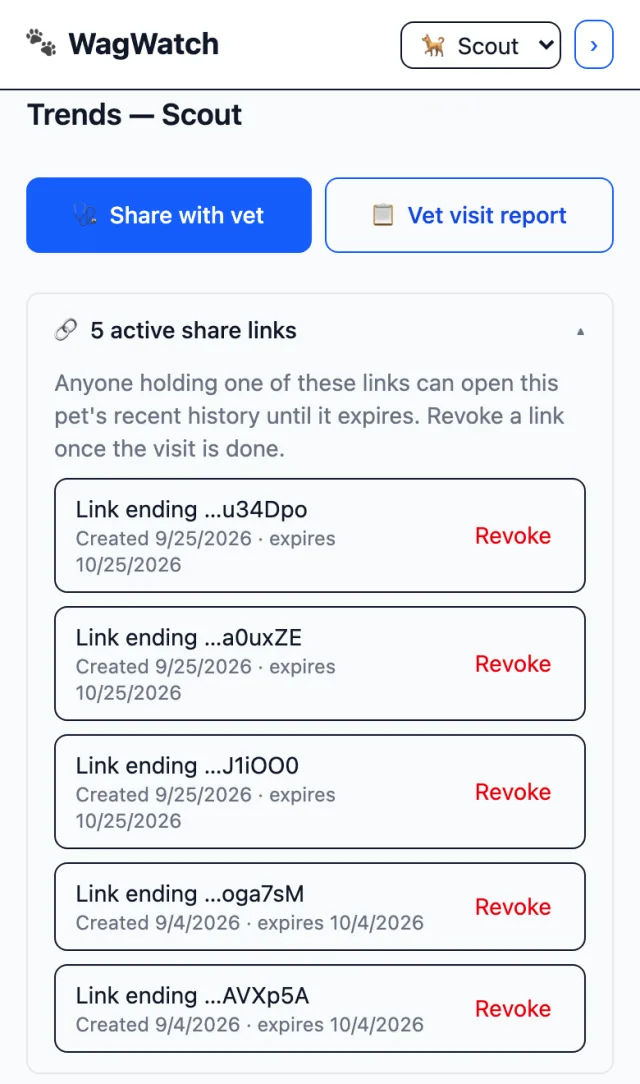
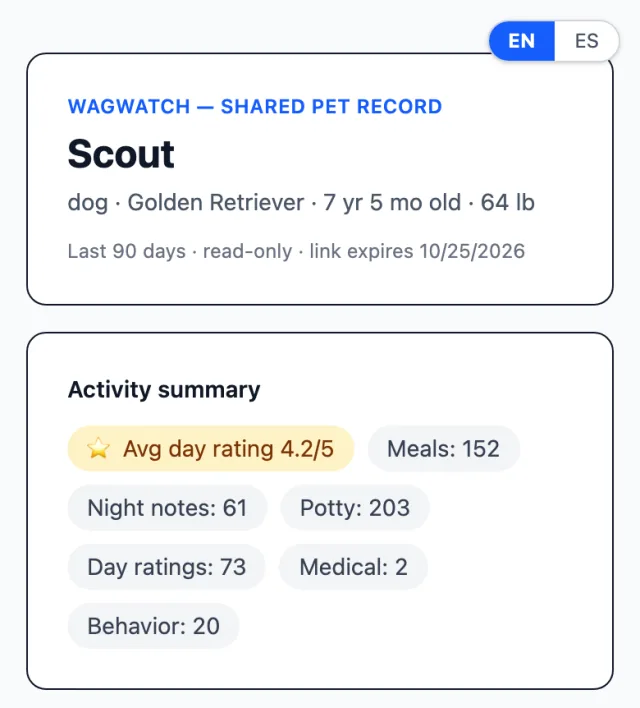
Screens shown are from the current version of the web app, at phone width. The iPhone and Android apps show the same list on Trends.
Sending one
- Open Trends and pick the pet. Share with vet is the blue button at the top, in the iPhone and Android apps and in the web app alike.
- Tap Share with vet. WagWatch makes the link and copies it to your clipboard. It shows the link on screen too, so you can open it yourself and see exactly what your vet will see.
- Paste it wherever your practice takes messages — an email, a text, the clinic’s own portal. Your vet opens it in any browser.
- After the visit, tap Revoke. Trends lists every live link for the pet under the button, with the day each one was made and the day it ends. Revoke ends a link straight away, for anyone who has it.
Anyone in your household can make a link for a pet you share. Creating one is part of Premium; seeing your links and revoking them is not, for reasons that come up further down.
What your vet sees
One pet, the last 90 days, on one page with nothing to click through:
- The pet. Name, species, breed, age and weight, and any conditions and allergies on its profile.
- The window. “Last 90 days · read-only”, and the date the link expires, at the top of the page, so nobody has to wonder how current it is.
- An activity summary. The average day rating, and how many of each kind of entry were logged in those 90 days: meals, potty, medication doses, medical, behavior, night notes and day ratings. Potty entries you marked as accidents get a count of their own.
- Medications. Every medication on the pet’s profile, current and stopped, however long ago, with its dose, how often, and when it started. One you have stopped says so, with the date it stopped.
- Vaccines. Every one on the pet’s profile, however long ago, with the date it was given and when the next is due.
- Medical notes. Every medical entry in the 90 days, newest first: its date, what it was (and how severe, if you said), and what you wrote.
The page is put together fresh each time it is opened, so it includes anything logged after you sent the link. It opens in English or Spanish, following the language of your vet’s own browser, with a switch in the corner. If the clinic wants a copy on file, it prints on plain white, with the language switch and the WagWatch link left off.
What it leaves out
- Photos. Pictures attached to entries stay in the app.
- Who logged what. The page never says which person in your household made an entry.
- Everything else. No entries from before the 90 days (the medication and vaccine lists are complete, however old), none of your other pets, and nothing about you: no email address, no household name, no members.
And it is read-only. Nobody holding the link can add, change or delete anything.
Why the link ends
A share link is a secret address: anyone who has it can open the page, no sign-in needed. That is what makes it effortless for a vet, and it is exactly why it does not last forever.
- Every link ends 30 days after you create it. Long enough for “the appointment is next month”, and there is no setting for a longer one. After that the page says the link is invalid or has expired, and asks the reader to get a fresh one from you.
- Revoke ends it now — for the vet, the clinic inbox, and anyone the email was forwarded to. Revoke it when the visit is done.
- An ended link gives nothing away. Expired, revoked or mistyped, the page shows the same message, so nobody can use it to learn whether a link ever existed.
- The address cannot be guessed. It ends in a long random code, and it opens this one pet’s page and nothing else.
- Search engines are told not to index it, and the web app the page opens in carries no analytics code at all.
- Each pet can have up to ten live links at once — room for a vet, a specialist and an emergency clinic. At ten, WagWatch opens the list so you can revoke one first.
If your plan changes
Creating a link is part of Premium. Seeing your links and revoking them never is. If your subscription ends, the links you already sent keep working until they expire or you revoke them, and Trends still lists every one with its Revoke button — nothing you have shared is ever left where you cannot reach it. Creating a new one needs Premium again.
A sitter or dog walker with a temporary pass cannot create, see or revoke share links. The pass is for logging, and a link to the pet’s history is yours to hand out.
Link, PDF or summary
Share with vet is one of three things WagWatch makes for an appointment, and they are meant to be used together:
| What | What it is | Plan |
|---|---|---|
| Share link Trends | A live, read-only page of the last 90 days that your vet can open before you arrive. Ends after 30 days, or when you revoke it. | Premium |
| Vet report PDF History | A file: the profile, medications and vaccines, a summary, and a log of the entries in order, with their times and notes. It says how many days of the range have an entry, so a quiet stretch reads as unlogged rather than uneventful. A file stays wherever it is sent; a link can be ended. | Free for the last 60 days; any range on Premium |
| Vet visit report Trends | A short written AI summary of the last 90 days, with a few questions to ask. It describes what was logged; it is not a verdict on your pet’s health. | Premium |
A combination that works: send the link a few days ahead so the vet can look before the appointment, bring the PDF if the clinic wants something for its file, and revoke the link on the way home. For what to write down beyond the log itself — the questions, the timeline, the things that are hard to say in the room — see what to write down before a vet appointment.
Questions
Does my vet need an account, or the app?
No. The link opens in any browser, on a phone or a clinic computer, with no sign-in. It shows one pet’s record and nothing else.
Can I make a link that lasts longer than 30 days?
No. Every link ends 30 days after you create it. For a longer course of care, send a fresh one before the next appointment, and revoke the old one.
What if I send it to the wrong address?
Open Trends, find the link in the list (it shows the day it was made and its last few characters) and tap Revoke. It stops working straight away for anyone who has it. Then make a new one for the right person.
Does it show the entries other people in my household logged?
Yes. The counts and medical notes include every entry from the last 90 days, whoever logged it. The page just does not say who that was.
Not a substitute for your vet
WagWatch is a tracking and logging tool, not a veterinary service. Its job is to help you bring a clear, accurate history to the people who care for your pet professionally.
Log it in WagWatch
Before your next appointment, open Trends, tap Share with vet, and open the link yourself: what you see is what your vet will see. The help pages cover sharing with your vet step by step, the medications page explains how doses and stop dates are recorded, and shared households shows how everyone’s entries land in one record. More posts are on the blog.


Free to use every day. Premium adds vet share links, the full history, every pet and the AI assistant — $3.99 a month or $24.99 a year, 14-day free trial.