 WagWatch
Trends: six charts drawn from your pet’s log, and how to read them
A single entry says what happened today. Trends is where a month of them becomes a shape: how the days have been rated, how many potty trips each week, which medical entries keep coming back, how your pet’s weight has moved. It is six charts drawn straight from what your household logged, two of them with a dashed line through the weekly counts.
A chart is easy to over-read, so this post covers what each one counts, what the dashed line is and is not, how to choose the window, and the things Trends deliberately leaves out.
What it looks like
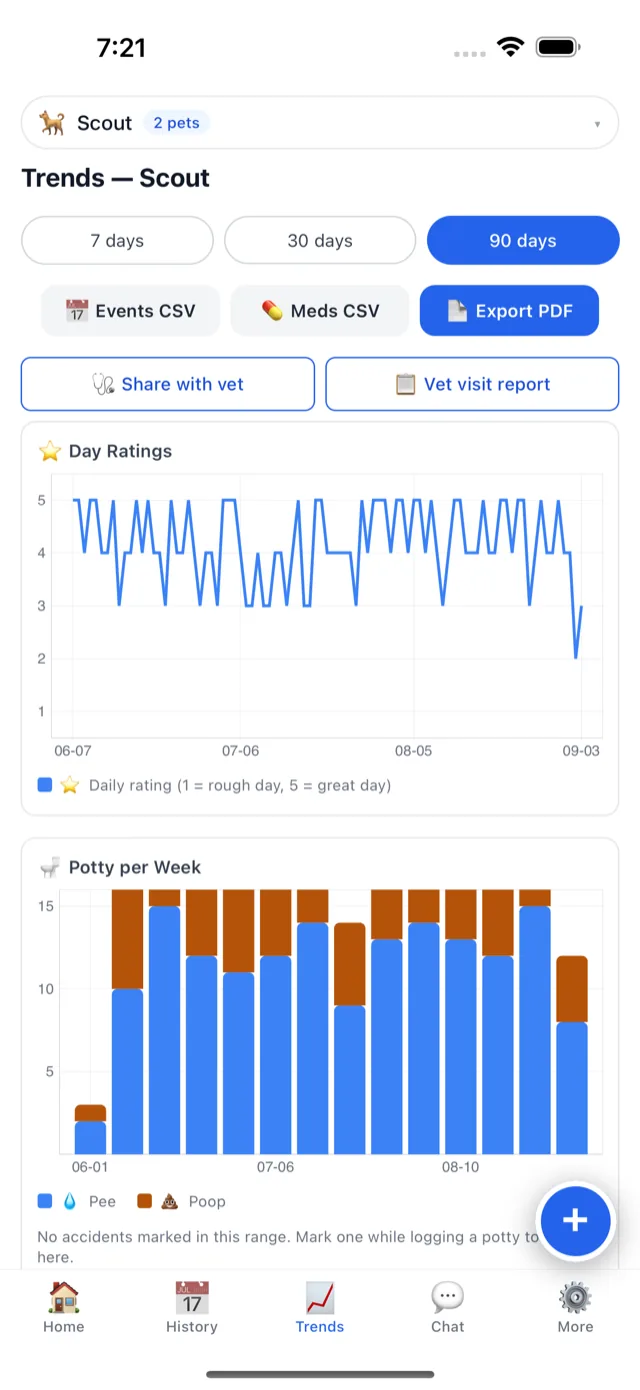
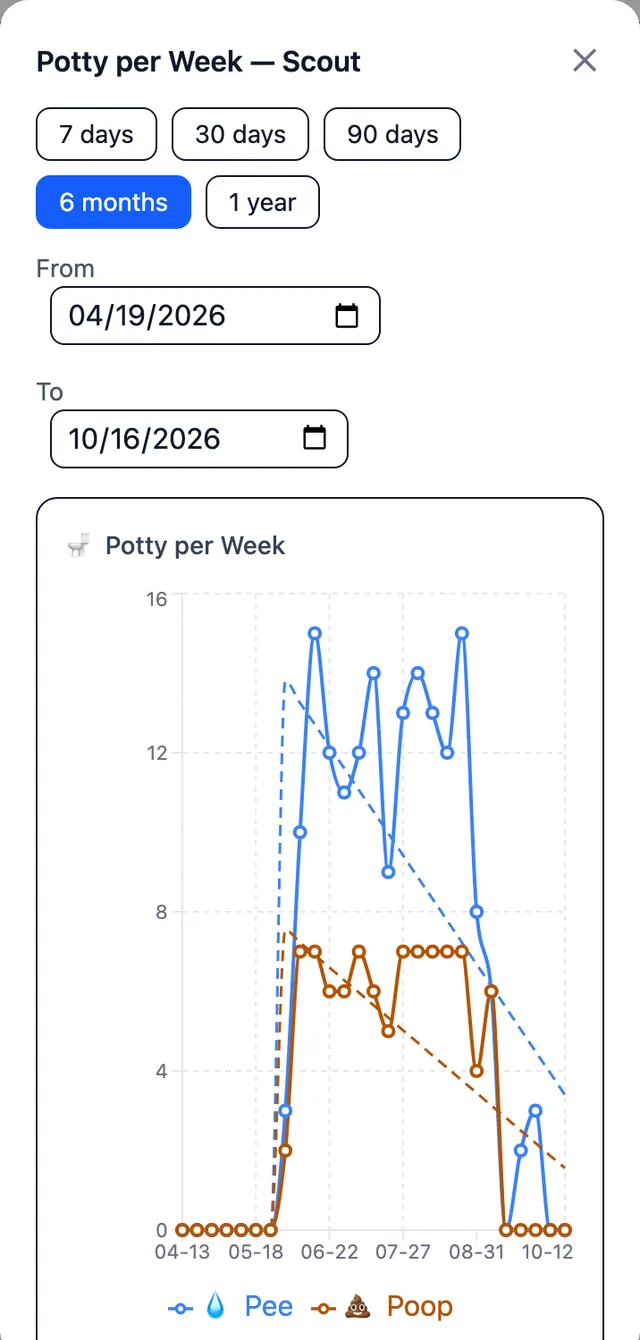
Screens shown are from the iPhone app with our sample pet, Buddy, and from the web app with one of our test pets. The Android app and the web app show the same charts, and since October 27, 2026 all three end with a sixth, Weight, which these screens predate.
Finding it
- Open Trends and pick the pet at the top.
- Choose a window: 7 days, 30 days, or the longest your plan shows at a glance — 60 days on the free plan, 90 on Premium.
- Tap a legend entry to hide or show that series, when one line is drowning out the others.
- Open a chart larger from the corner of its card, to choose 6 months, a year, or your own From and To dates.
The six charts
| Chart | What it counts | Worth knowing |
|---|---|---|
| Day Ratings | The 1–5 rating for each day, as a line, with the faces you tap on the axis | The axis is the whole window, and a day nobody rated has no point of its own: it is never drawn as a zero |
| Potty per Week | Every potty entry per week, as lines for pee and poop, and a third for the ones marked as an accident when the window has any | Counts trips logged, whoever logged them |
| Accidents per Week | Only the trips marked as an accident, as bars | Shown only when the window has one, so an empty chart never claims there were none |
| Medical Events per Week | Medical entries per week, one line per kind: vomiting, limping, diarrhea | Your own words, from Other, get a line of their own |
| Behavioral Changes per Week | Every behavior entry per week, as bars | One total per week, whatever the behavior |
| Weight | Every weigh-in, in pounds or kilograms, as a stepped line with a dot on each day you weighed | A day without a weigh-in shows the last weight logged, so the line never drops to zero between weighings |
Each chart also has a one-sentence summary for screen readers, such as the number of days rated and their average, so the shape is not only something to look at.
What the dashed line is
On Potty per Week and Medical Events per Week, each series has a dashed line of its own colour. It is the straight line that fits that series’ weekly points best, in the window you are looking at — nothing cleverer than that.
- It describes the window, not the future. It says which way the weeks on the screen lean. It does not say what next week will bring.
- It starts when your pet’s log does. The fit begins in the week you added your pet to WagWatch, or in the week of the window’s earliest entry if that is earlier (an entry logged for a day before you added the pet). Weeks before then sit at zero on the chart but are left out of the fit; the dashed line runs along them until it joins the fitted line. For a pet added before the window starts, every week counts. Either way, the first week usually counts only part of a week, from the day the log or the window starts, so its point sits low and tilts the line up, less so the more full weeks follow it.
- It changes with the window. The same weeks can lean one way over 30 days and another over six months. That is the arithmetic, not a change in your pet.
- Sometimes there is none. A series that has been the same in every week shown since your pet’s log started has none, and a pet whose log starts this week has none yet: a straight line through one point says nothing.
- The day ratings and the bar charts have none. The rating line is already the day-by-day shape.
The weight chart
Weight is the last card on Trends, and it draws the weigh-ins you log: tap the log button, pick Weight, and type the number in pounds or kilograms. The newest weigh-in also becomes the weight on your pet’s profile, so there is nothing else to update. It reads differently from the charts above it:
- Every day has a weight. The line moves in steps: a day without a weigh-in shows the last weight logged, carried forward until the next one, even from a weigh-in made before the window starts. Each day with a weigh-in of its own gets a dot, so you can tell a measured day from a carried one.
- It starts at the first weigh-in. Days before the first weight you logged have no point at all. Nothing is drawn as zero.
- The axis fits the line. It does not start at zero, which would flatten every real change, and it is padded, so a reading a fraction of a pound off does not look like a cliff.
- One unit. The chart uses the unit of the newest weigh-in and converts any readings logged in the other one.
- No dashed line, and no verdict. The chart shows the readings. Whether a gain or a loss matters is a question for your vet.
Weigh-ins also go with your pet’s record: the Vet report PDF lists them with their dates, a share link shows them to your vet, and the AI assistant on Premium can read them when you ask.
Reading it honestly
Trends draws what was logged, week by week, so three things can move a chart without anything changing in your pet:
- The newest week is still happening. Its point counts only the days so far, so on a Tuesday it sits low, and it pulls the dashed lines down with it until the week is over.
- A week with nothing on the chart counts as zero. A week away, a week the log was forgotten, a week older than the 60 days the free plan shows: each counts as nothing, and the dashed line leans toward it. The only weeks left out are the ones before your pet’s log starts. In the six-month chart above, the near-empty weeks since mid-September are why both lines slope down. If you added your pet before you began logging regularly, choose a window that starts when your logging did.
- A count is what was logged. Two people logging the same walk make two trips; a trip nobody logged is not on the chart. Everyone logging into the same record, from their own phone, is what makes the counts worth reading.
And a line is not a verdict. Trends shows that the potty trips rose, not why, and whether a change matters is a question for someone who can examine your pet. What Trends makes easy is showing them: the Share with vet button at the top of the screen creates a read-only link to the counts and notes, on Premium, and History’s Vet report PDF prints the entries themselves, on every plan.
What Trends does not draw
Six charts is a choice, and some of your log lives elsewhere:
- Night ratings. Trends draws the day rating only. The night ratings are in History, and on Premium the Weekly Review compares the week’s night average with the week before.
- Meals and how much was eaten. Every meal is in History, and the Weekly Review counts the week’s meals and the ones logged as None eaten.
- Water. WagWatch has no water counter, so there is nothing to chart; a note on an entry holds the day’s bowl readings, and History’s search finds them.
- The calendar. The heatmap that colours each day by its day rating is in History, above the list of entries.
Premium, and the free plan
Trends is on every plan. On the free plan the charts draw the last 60 days, whatever window you choose: a year-long window on the free plan still shows only the newest 60 days of entries. Premium adds the 90-day quick window, charts over up to three years in the larger view, and the two buttons at the top of the screen — Share with vet, and the AI-written Vet visit report. Nothing older than 60 days is deleted on the free plan; it is kept, and it is all in the free export.
Questions
Why does the last point always dip?
Because the newest week is not over. Its point counts the days so far, so early in the week it is low. It catches up as the week is logged.
Can I send my vet a chart?
Trends has no export of its own. A share link (Premium) puts the last 90 days of counts, medical notes and weigh-ins, and the medication and vaccine lists, in front of your vet without an account; the Vet report PDF from History prints the entries, on every plan.
Why is there a line for something I only logged once?
Medical Events per Week draws a line for every kind logged in the window, and one entry is enough to make a kind. Tap its legend entry to hide it.
Not a substitute for your vet
WagWatch is a tracking and logging tool, not a veterinary service. Its job is to help you bring a clear, accurate history to the people who care for your pet professionally.
Log it in WagWatch
Trends is only as good as the log: rate the day, log every potty trip with the accident flag when it applies, and write medical entries on the day they happen. The help pages cover logging step by step, seven small changes worth logging in a senior pet covers what to watch for, and shared households shows how everyone’s entries land in one record. More posts are on the blog.


Free to use every day, Trends included. Premium adds the full history, every pet, the Weekly Review and the AI assistant — $3.99 a month or $24.99 a year, with a 14-day free trial for new subscribers in the iPhone and Android apps.