 WagWatch
Logging with no signal: what Pending means, and when the entry arrives
No signal at the park, in a basement or out at the barn? On iPhone and Android, WagWatch saves what you log on the phone first and sends it when the connection comes back. Until then the entry is already in your history, marked Pending, at the date and time on its form.
This post covers what you see while an entry waits, when it is sent and in what order, why it cannot be saved twice, what Failed means and what to do about it, opening the app with no connection, and what still needs one.
What it looks like
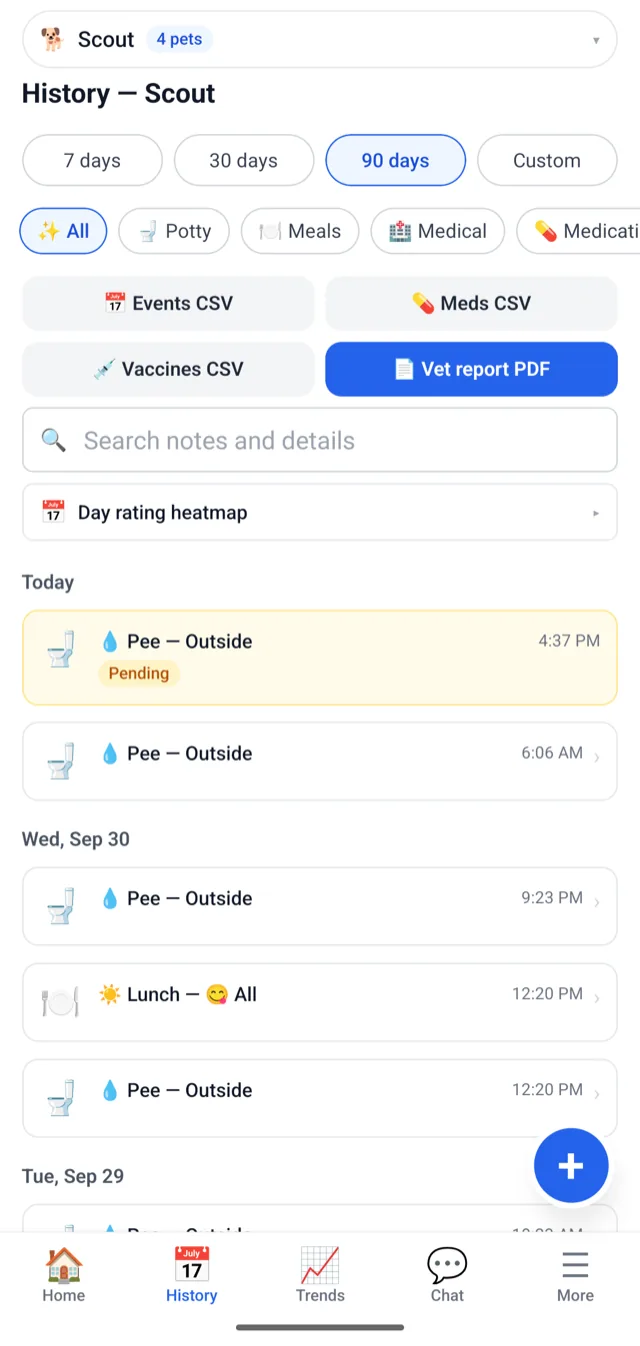
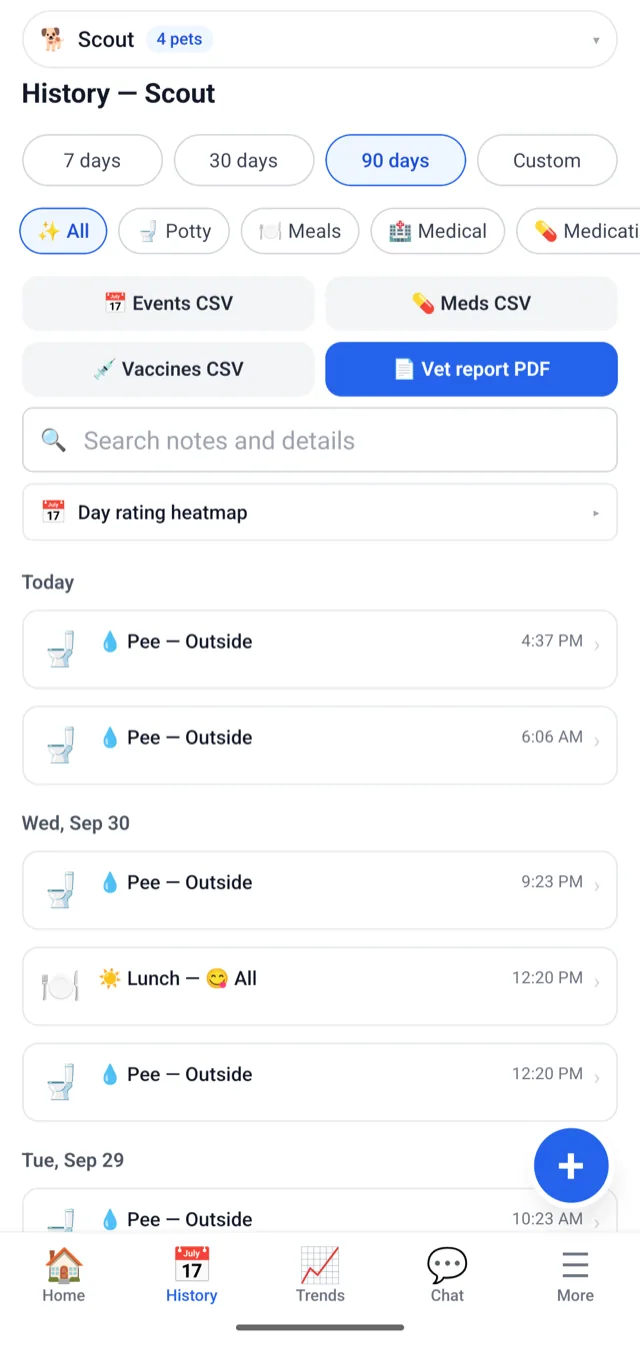
Screens shown are from the Android app, with one of our test pets: the first taken in airplane mode, the second a few seconds after it was turned off. The iPhone app shows the same labels.
Saving with no signal
Every new entry takes the same path, signal or not: the entry forms, Log full day and the question on Home about how yesterday went all write it to the phone first and send it from there. So Save never waits on the network, and the form closes straight away. Before it does, the form checks the entry the way our server will, so a mistake such as an empty Other place is shown on the form instead of turning into a failed entry later. It also refuses a time on a later day: no screen would show that entry until the day came.
The entry then shows in History on its own day, and on Home if it is dated today, with an amber Pending label. A Pending entry cannot be opened yet, because there is nothing on our side to open. It stays on the phone if you close the app: open WagWatch again with no signal, and it is still there, waiting.
When it is sent
WagWatch sends what is waiting as soon as the phone is back online with the app open, or the next time you open it. On a Wi-Fi network that asks you to sign in or accept its terms first, as many cafés and hotels do, it waits until the internet itself answers, not just the Wi-Fi.
Entries go out oldest first, and each keeps the date and time on its form rather than the moment it arrived. So a morning of entries logged with no signal lands in your history in the order it happened, and each Pending label goes away as that entry is sent. From then on the rest of the household sees it too, and opening it shows you as the person who entered it, just as if you had logged it with full signal. Until then, it exists only on your phone.
Why an entry cannot be saved twice
A connection that drops halfway is the awkward case: the entry may have reached WagWatch even though the phone never heard back, so the phone sends it again. To make that safe, every entry gets its own one-time key when you save it, and the same key goes with every try. If our server already has that entry, it does not store it again, and the phone counts the entry as sent. A retry, or Try again on a failed entry, cannot leave a second copy in your history.
When an entry cannot be sent
Most of the time there is nothing to do. While the phone has no connection at all, WagWatch does not try, so nothing is used up waiting for signal. If a send fails while the phone is online (a weak signal, a network that blocks it, a moment when our servers do not answer), the app tries again by itself: after about a second, then two, four, eight and so on, doubling each time. When the connection comes back after a drop, it does not wait for the next try; it sends straight away.
If ten tries in a row fail (with the app open, about eight and a half minutes of trying), or WagWatch refuses the entry outright, the label turns red and says Failed. Tap the entry and the app says why it was not saved:
- You were signed out when it was sent. Sign in, then choose Try again.
- It could not reach WagWatch after several tries. Choose Try again when the connection is better.
- You no longer have access to this pet, for example because a temporary pass ended.
- WagWatch did not accept the entry, or it needs Premium.
For the last two, sending the entry again would be refused the same way, so the dialog offers Discard and no Try again. Try again puts the same entry back in line with the same key, so it still cannot be saved twice. Discard removes it from the phone. Until you choose, a failed entry stays in History on its day.
Opening the app with no connection
Since version 1.3.7, opening WagWatch with no connection keeps you signed in, with your pets on screen. Anything still waiting to send is listed, marked Pending, and you can log more. Entries already saved, yours and the rest of the household’s, appear once the phone is back online. The pets a temporary pass lets you log for are not kept on the phone, though: they are offered again once the phone is online and WagWatch is reopened or brought back to the front.
Signing in, for the first time or after signing out, needs a connection. Since the same version, trying it with none says you are offline, instead of showing an unknown error.
What still needs a connection
- Changing or deleting an entry. Edits and deletions go straight to WagWatch, so they need a connection at the time. A Pending entry can be changed once it has been sent.
- Choosing a medication. The Medication form lists your pet’s medications from WagWatch, so with no signal it may have none to pick from, and then a dose cannot be logged until the phone is back online. Adding a medication needs a connection too.
- Photos. With no signal the photo cannot upload, and the entry saves without it. Add it later by editing the entry; photos are part of Premium.
- What the rest of the household logs. Their entries reach your phone once it is back online.
- The web app. It has nowhere to keep an entry for later. If it cannot reach WagWatch, the form stays open with what you entered and says so, and Save tries again with the same key.
If it does not look right
- Still Pending with signal back? Bring WagWatch to the front: it sends what is waiting each time it opens or comes back on screen.
- Sent, but not in the list? Pull down to refresh. Right after an entry is sent, the list can take a moment to catch up.
- Not on someone else’s phone yet? It reaches theirs after yours has sent it, and pulling down to refresh fetches the latest. Troubleshooting in the help pages has the rest of that checklist.
- Failed? Tap it, and see When an entry cannot be sent.
Questions
Is this part of Premium?
No. It is how every entry is saved, on every plan.
Does the web app keep entries until there is a connection?
No, only the iPhone and Android apps do. The web app saves straight to WagWatch, so it needs a connection to save.
What if I sign out with entries waiting?
Choosing Sign Out removes them, along with everything else WagWatch keeps on the phone for your account. If WagWatch signs you out because the session ended, they are kept for when you sign back in. If anything says Pending, let it send before you sign out; if it says Failed, choose Try again or Discard first.
How long does the app stay signed in with no connection?
As long as the sign-in on that phone is less than 30 days old. Past that, the app opens on the sign-in screen, and signing in needs a connection.
Two of us logged the same potty break with no signal. Does WagWatch merge them?
No. Each phone sends its own entries, so the potty break shows up twice, and opening each one shows who entered it.
What about my wrist?
On iPhone, the Apple Watch app keeps what you log until the phone is in reach. Once the phone has it, it waits and sends like everything logged on the phone.
Not a substitute for your vet
WagWatch is a tracking and logging tool, not a veterinary service. Its job is to help you bring a clear, accurate history to the people who care for your pet professionally.
Log it in WagWatch
Log it when it happens, wherever you are, and let the phone send it when it can. The help pages cover logging step by step, and shared households shows how everyone’s entries land in one record. More posts are on the blog.


Free to use every day, saving with no signal included. Premium adds the full history, every pet, the Weekly Review and the AI assistant — $3.99 a month or $24.99 a year, with a 14-day free trial for new subscribers in the iPhone and Android apps.