WagWatch 2.0: a new look, condition tracking, a daily check-in, and label scanning
WagWatch 2.0 is here on iPhone, Android, and the web: a new look, tracking for diabetes, seizures, mobility, cognitive decline, and kidney care, a quick daily check-in, a card on Home when a pattern in your log changes, and label scanning that fills in a medication or vaccine for you to check. The phone apps add Lifetime Premium: pay once.
WagWatch 2.0 is our biggest update since 1.0, with the new look running from the first screen to the widgets. We built WagWatch because every vet visit started with “How has she been?” and the honest answer was a feeling, not data (the story is here). 2.0 keeps that one idea, one shared log for everyone who looks after a pet, and makes it quicker to start, quicker to keep up each day, and more useful for a pet with an ongoing condition.
To everyone who helps, the partner who logs the 6 a.m. breakfast, the roommate who gives the evening dose, the sitter who writes down the walk: thank you. This one is for you.
What is in 2.0
- A new look: colors, icons, type, and dark mode.
- Condition tracking for diabetes, seizures, mobility, cognitive decline, and kidney care.
- A daily check-in: appetite, energy, stool, and mood.
- “Something changed” cards on Home when a pattern in the log shifts.
- Scan a label or a vaccine record into a draft you check before saving.
- Sleep: naps and nights, in hours.
- Given, right from a medication reminder.
- Ask the assistant from Trends, with the lookups it made shown.
- A new first launch: start with your pet, or join a household by code.
- The widgets and the Apple Watch in the new look, with new tiles.
- Lifetime Premium in the iPhone and Android apps: pay once, it never renews.
A new look
2.0 takes its colors from our icon: a warm cream and a deep forest green, with teal and amber for the things you log. Dark mode has a new look too, forest-black with mint, and Appearance in More still starts in light. Every emoji in the app is now a line icon, and titles and text have new type. Home opens on a ring for each pet that shows today’s potty breaks, meals, and doses at a glance, and on a wide screen the web app has a rail down the side.
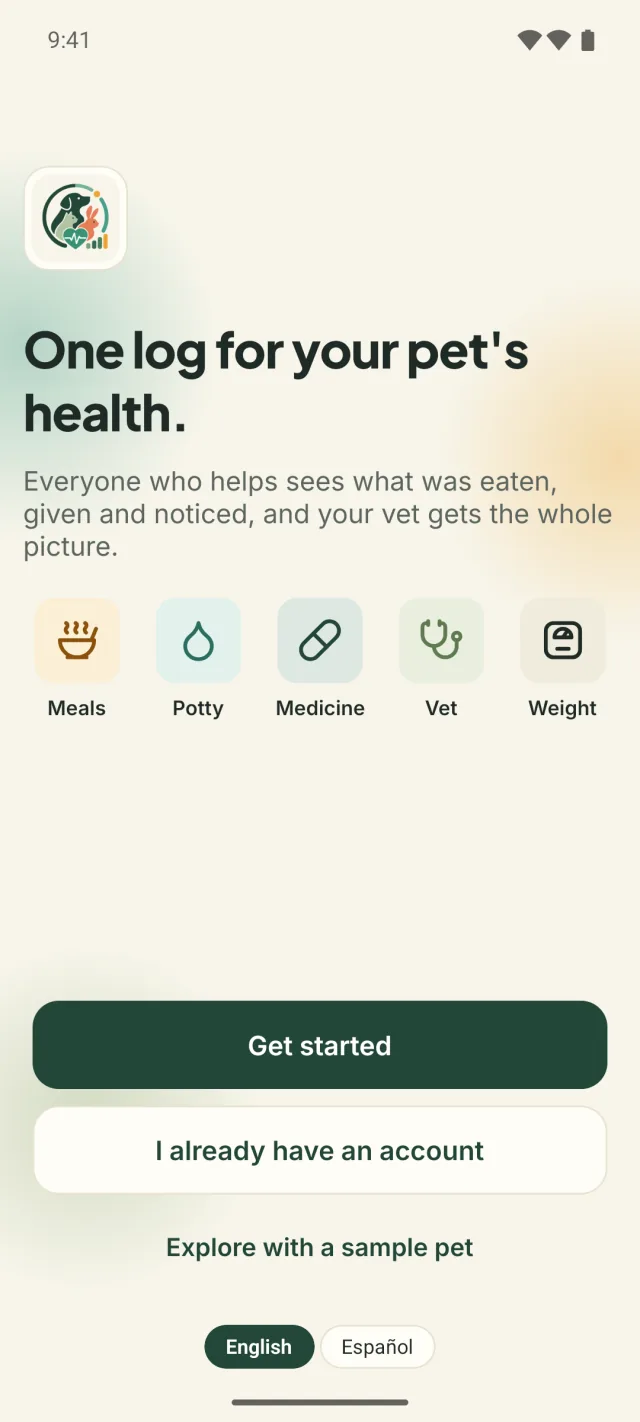
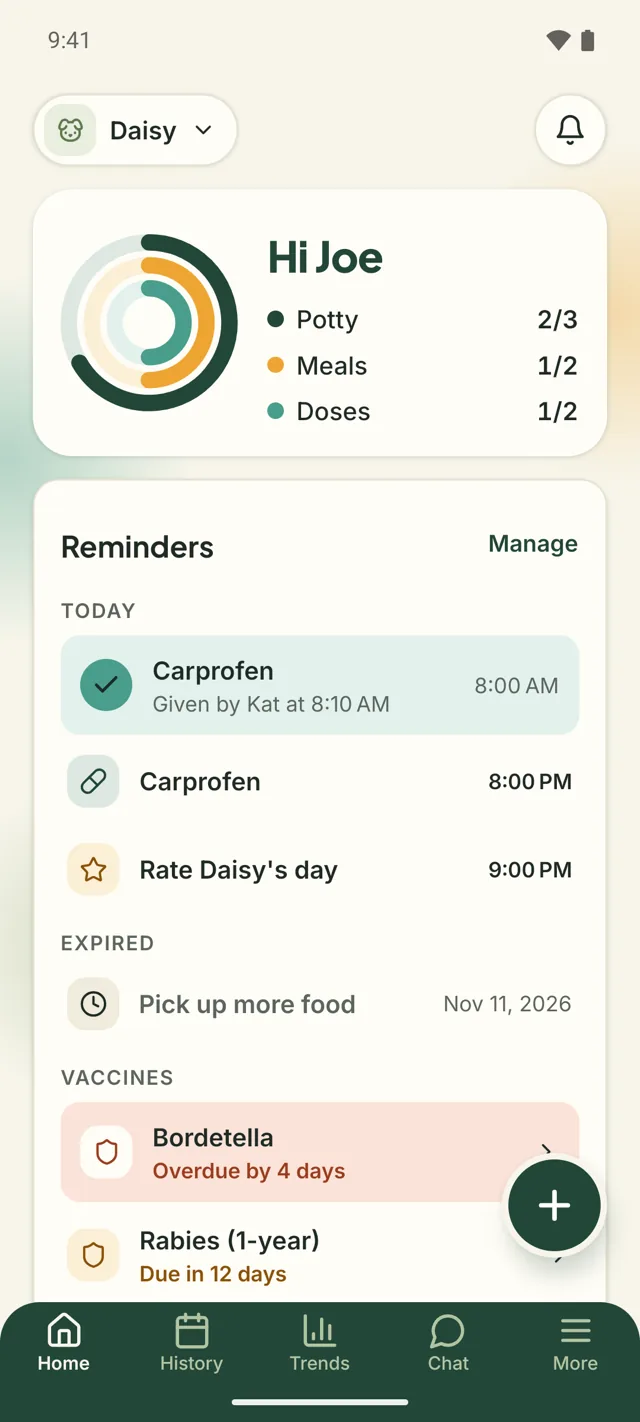
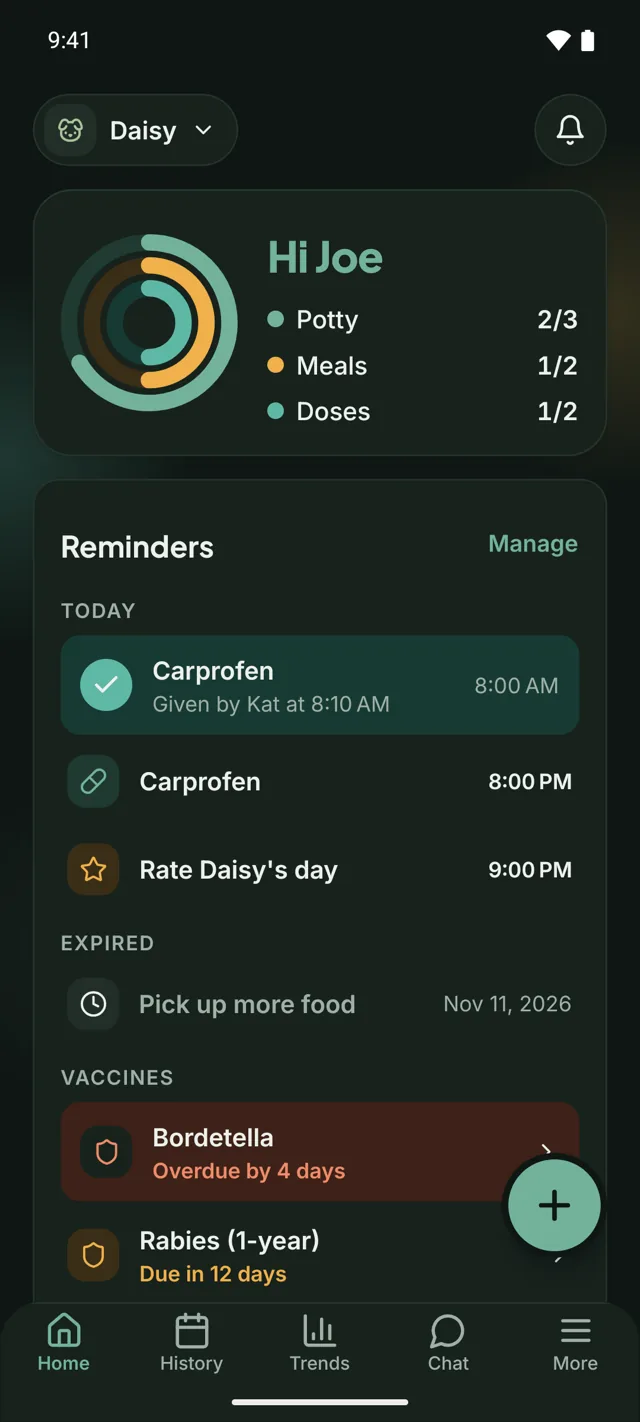
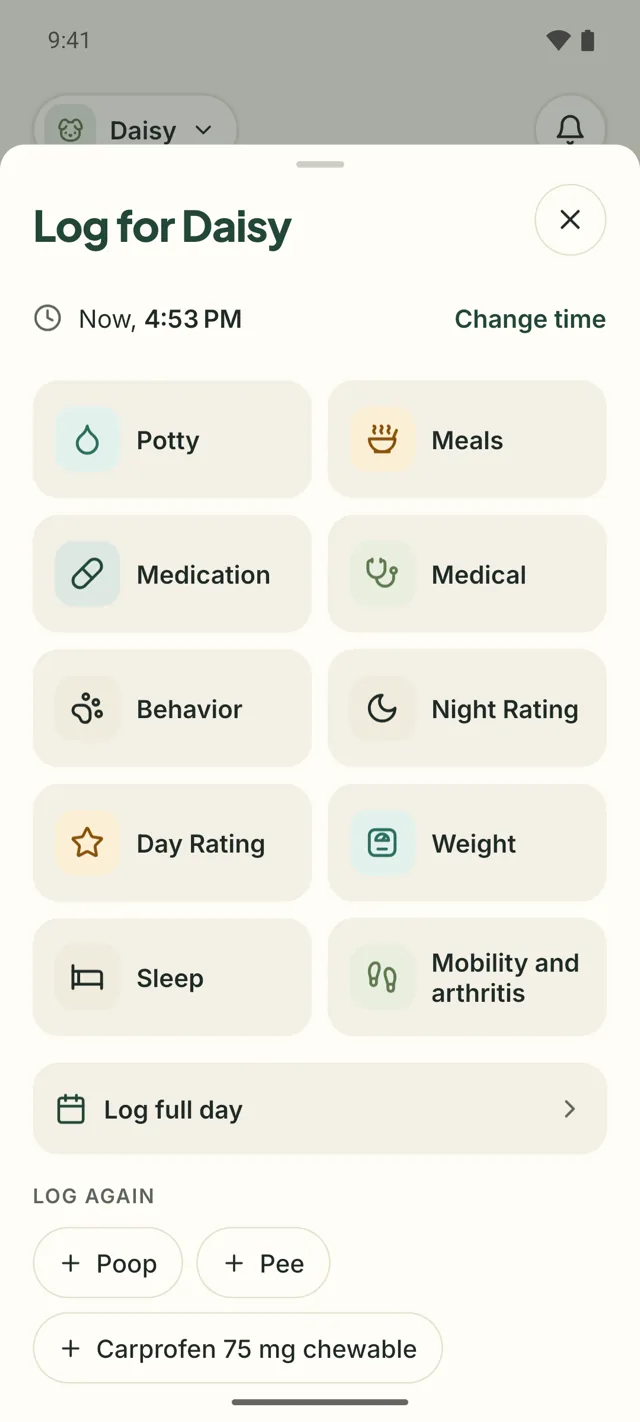
Screens shown are from our sample household, Joe, Kat, and their dog Daisy, in the Android app. The iPhone and Android apps and the web have the same features; the web lays them out wider on a big screen.
How does condition tracking work in 2.0?
In 2.0 you turn a condition on for a pet, under Conditions in the pet’s profile or in setup (“Does Daisy have any of these?”), and it gets its own tile on Home and in the log sheet, with a form made for it. A pet with an ongoing condition needs a few things logged every day, the same way each time.
| Condition | For | What you log |
|---|---|---|
| Diabetes | Dogs and cats | Blood glucose in mg/dL or mmol/L, insulin in units, the time |
| Seizures | Every pet | When it started and how long it lasted, in minutes and seconds |
| Mobility and arthritis | Every pet | A mobility score from 1 to 5 |
| Cognitive decline | Dogs and cats | Night pacing, confusion, sundowning: yes or no |
| Kidney care | Dogs and cats | Water intake in ml, cups, or fl oz, or less, about the same, or more |
Two or more seizures within 24 hours are marked Cluster on the entries, so you never have to work it out at 3 a.m. For diabetes you can add the target range your vet gave you; leave it empty if you do not have one. If the profile already says “diabetes” in its notes, WagWatch asks “You noted Diabetes. Track it?” and nothing is turned on for you.
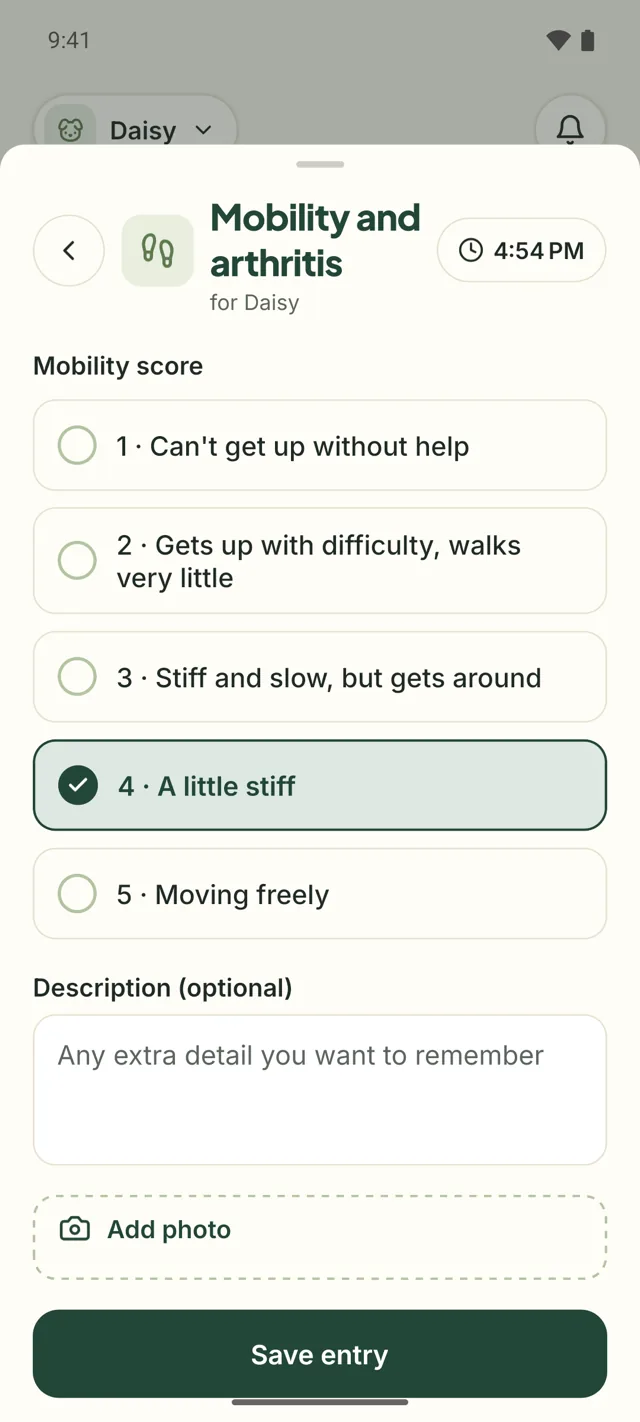
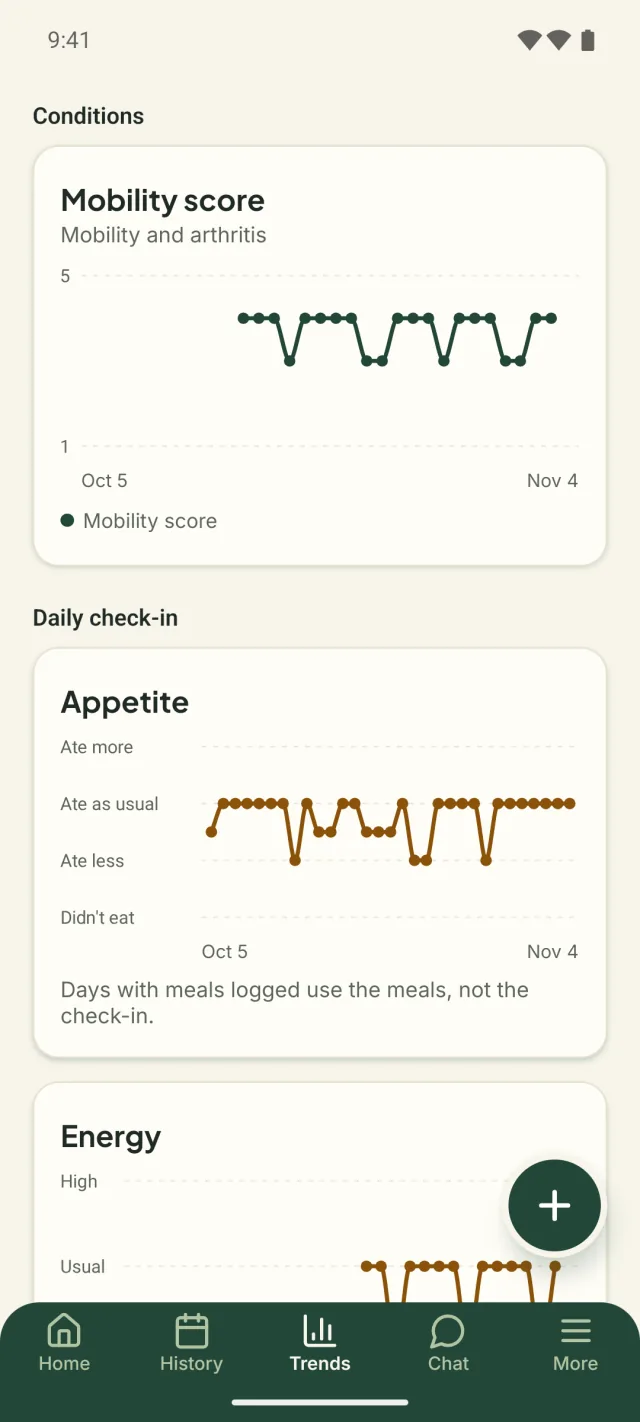
Anyone in the household can turn a condition on or off. Turning one off hides its tile and keeps every entry. Each tracked condition gets its own chart in Trends and its own section in the Vet report PDF, and it shows on the vet share link. If you have been keeping seizures in a notebook, our seizure diary post shows what is worth writing down.
What is the daily check-in?
The daily check-in is a card on Home that asks “How was Daisy today?” Most days nothing in particular happens, and those days are worth a record too, so the card has up to four quick questions (a fish, for one, gets no Stool question):
| Question | Answers |
|---|---|
| Appetite | Didn’t eat, Ate less, Ate as usual, Ate more |
| Energy | Low, Usual, High |
| Stool | Usual, Soft, Runny, Hard, None today |
| Mood | Not themselves, Okay, Bright |
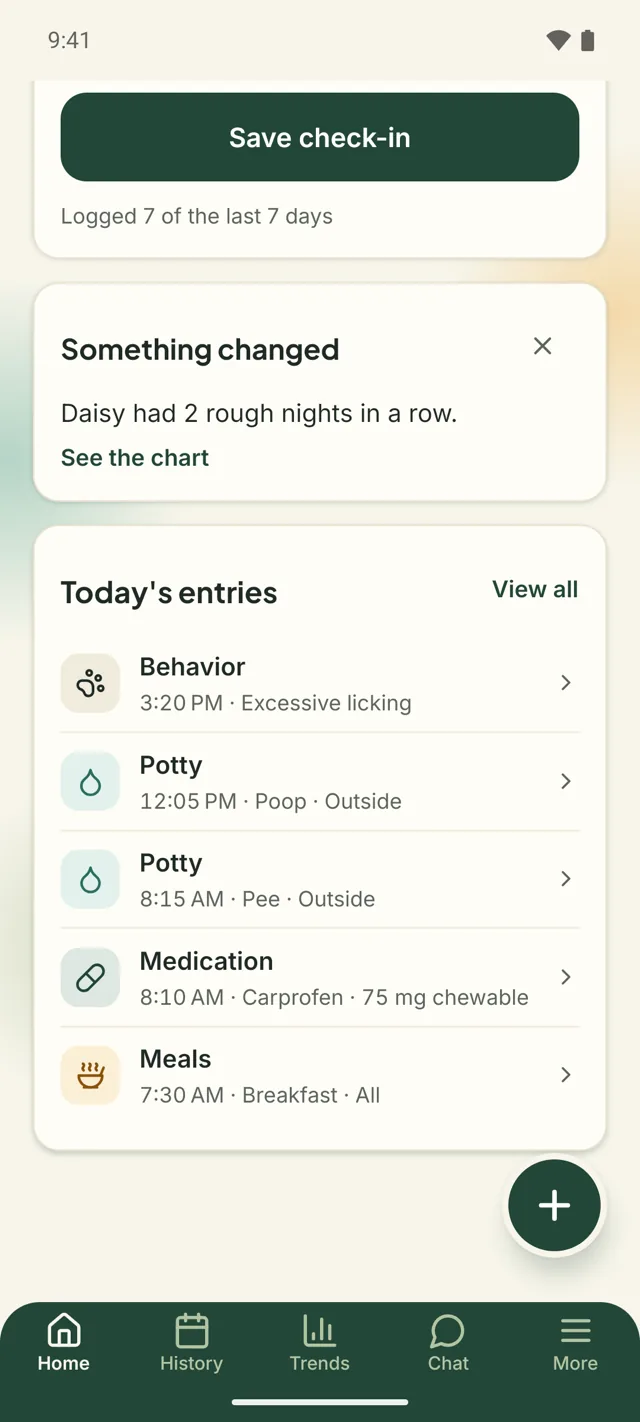
Skip any question you like, and add a note if you want. There is one check-in per pet per day for the whole household: if Kat already checked in, your answers update it, and History says “edited by” you. Once it is saved, the card shows a line such as “Logged 5 of the last 7 days,” which counts days with anything logged by anyone. There are no streaks to keep.
When today’s check-in is done, the 8 PM day rating reminder stays quiet for that pet. Don’t want the card? Turn off Daily check-in in More; it is a setting for you alone.
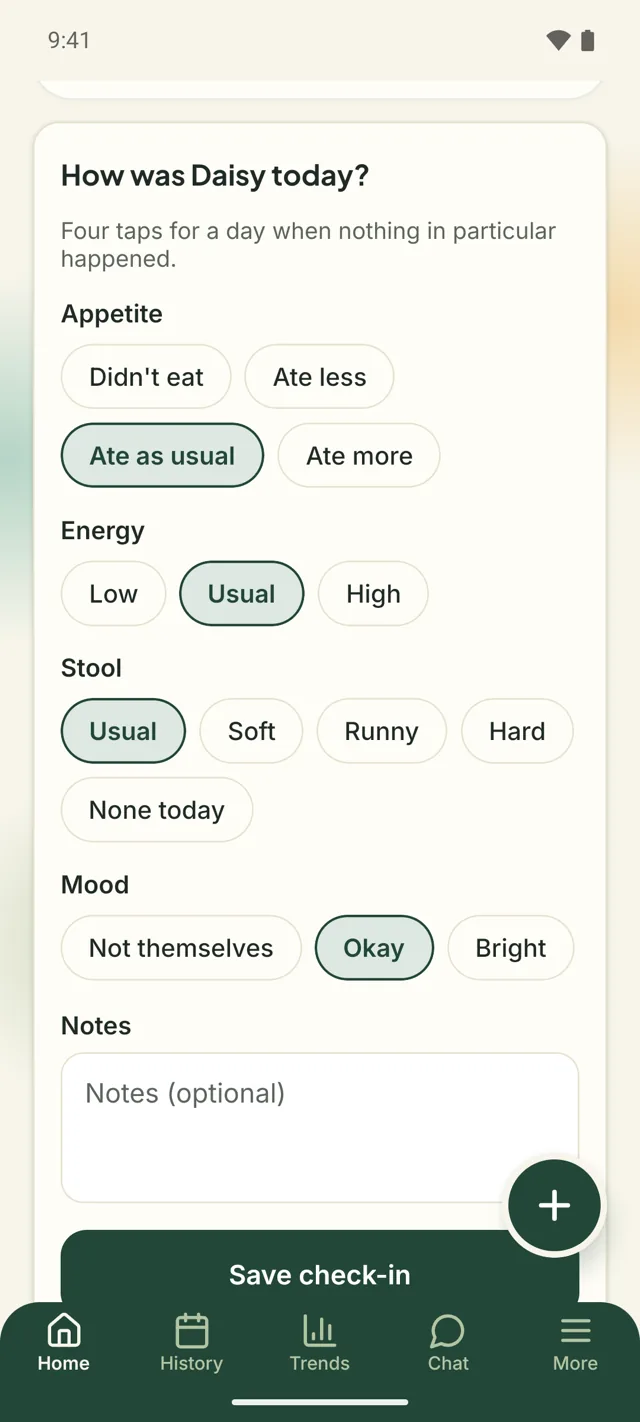
The check-in answers have their own charts in Trends. A meal you logged still counts first: on a day with meals logged, Trends reads appetite from them, and a “Runny” stool never counts as a potty entry.
What does a “Something changed” card tell you?
A “Something changed” card on Home says what changed, in plain words, when a pattern in the log shifts. A slow change is the hardest kind to notice when you see a pet every day. For example:
- “Daisy ate less than usual 3 days in a row.”
- “Daisy had 2 rough nights in a row.”
- “Daisy had 4 accidents this week, compared with 1 last week.”
The cards read whole days, up to yesterday. A card goes away after seven days, or sooner if the pattern ends, and you can dismiss it with ×. Everyone sees the same words on the card; with Premium, See the chart opens the chart behind it and compares this week with the last three months. The cards describe your log. They do not say what it means, and that conversation is one for your vet. A sitter with a pass does not see them, and Something changed alerts in More turns them off for you.
How does label scanning work?
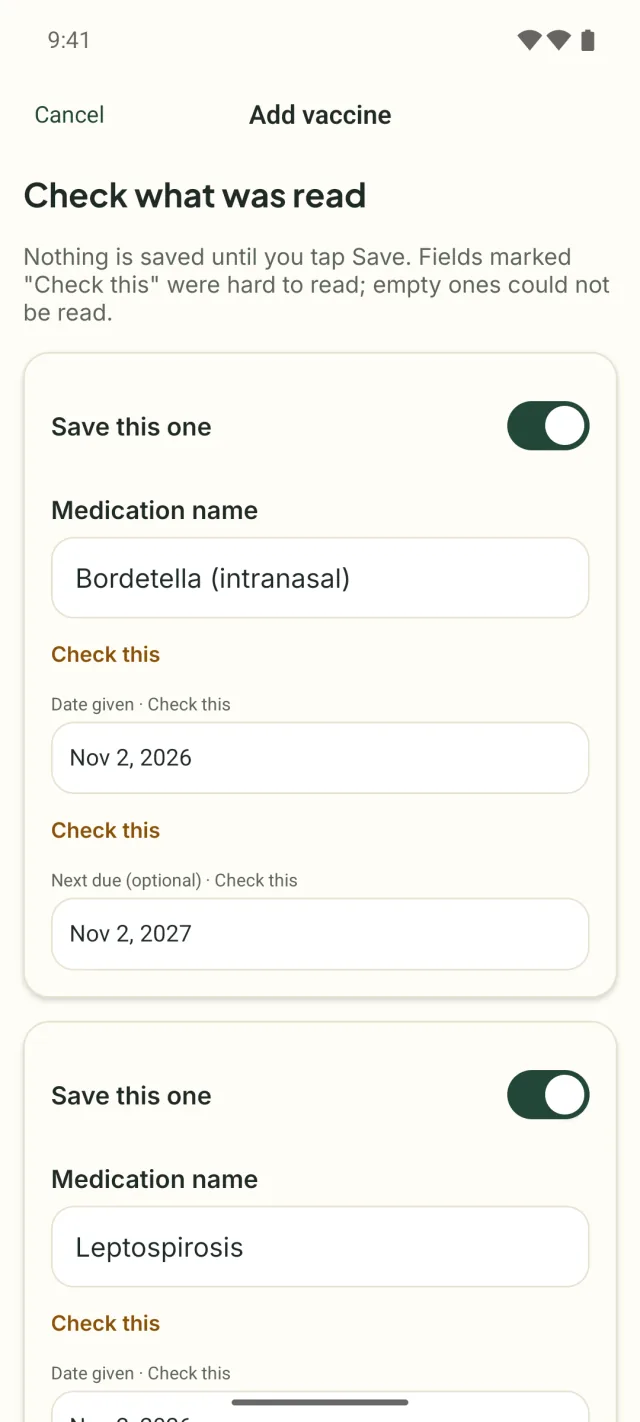
In 2.0, Scan a label under Add medication, or Scan a vaccine record under Add vaccine, takes a photo of a pharmacy label, a discharge sheet, or a vaccine certificate and reads it into a draft, because typing a medication in from a pill bottle is fiddly. The draft screen, “Check what was read,” lets you edit every field, marks the ones that were hard to read with “Check this,” and turns a sheet with several medicines on it into several drafts. Nothing is saved until you tap Save, so check each field against the label first.
A free household gets one scan a month, and a scan that reads nothing does not count. Premium scans as many labels as you like. The photo is sent to the AI model we already use (made by Anthropic; Amazon Bedrock is the backup) to read the text, and we do not keep it unless you tick Attach this photo to the record (photos on records are Premium, like photos on entries). The privacy policy has the details.
Naps and nights
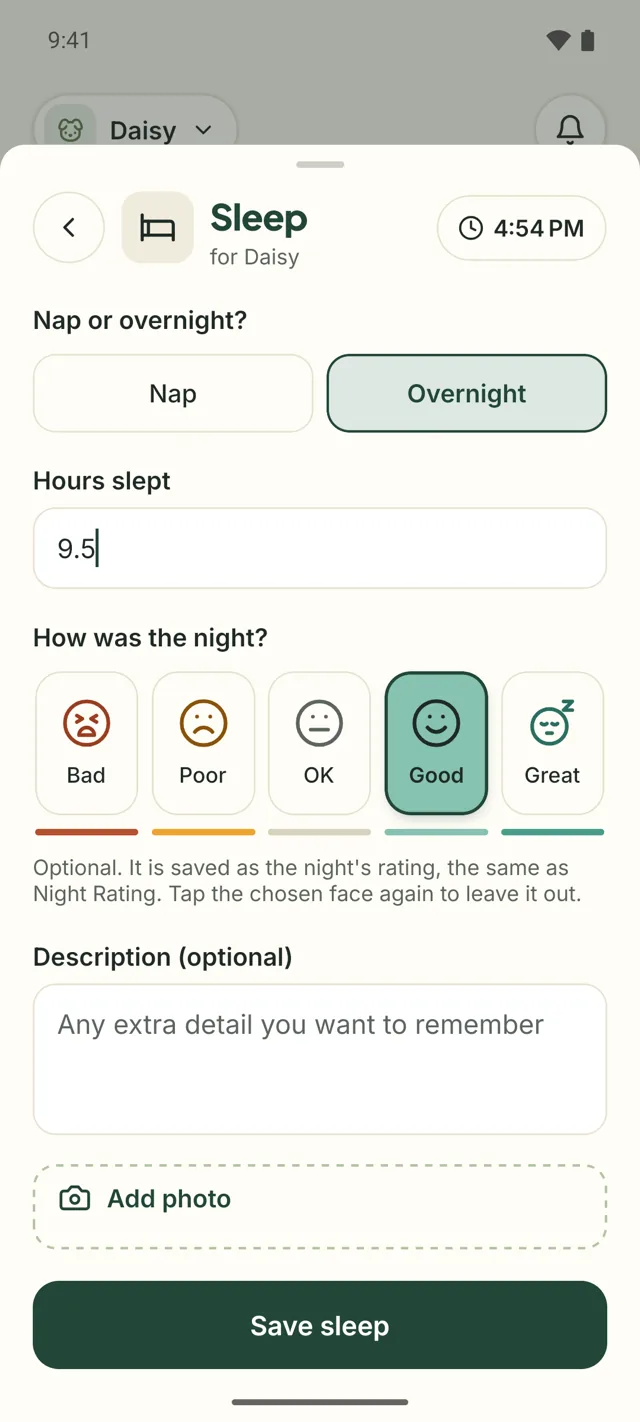
Sleep is a new entry in the log sheet: Nap or overnight? and the hours slept, from a quarter of an hour to 24. An overnight entry shows the night rating’s five faces on the same page, so one entry covers how long and how well; the rating is optional and is saved as the night’s rating, the same as Night Rating. Trends shows the average hours on the days with a sleep logged, and the assistant can read your pet’s sleeps when you ask about them.
Given, from the reminder
On iPhone and Android, a medication reminder now names the medicine and the pet and has a Given button. Tap it on the lock screen, in the notifications, or on a paired Apple Watch, and the dose is logged at the moment you tapped, under your name, without opening the app. It reaches the household’s log the next time the app opens on that phone. Vaccine, day rating, and custom reminders still open the app when tapped. The web has no notifications, so this one is phones only.
Ask the assistant from Trends
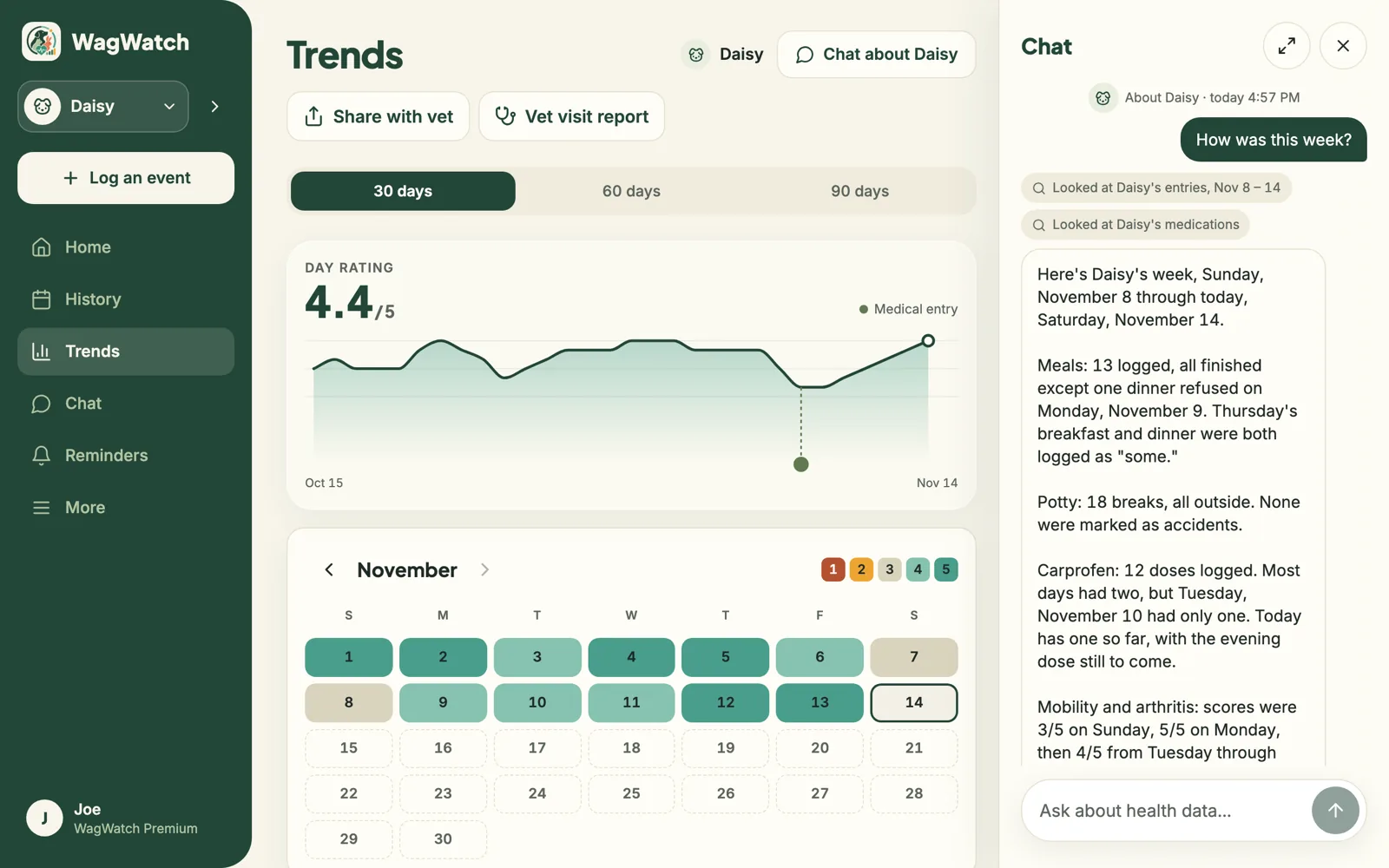
The best questions come up while you are looking at a chart. In 2.0, Trends has a Chat button for the pet on screen; on a wide screen the assistant opens beside the charts. Every answer shows what it looked at before answering, in small chips such as “Looked at Daisy’s entries, Nov 8 – 14.” The assistant is part of Premium, as it has always been, and keeps the same rules: it describes what was logged and never gives a verdict or a dose of its own. The assistant’s answers are AI-generated and can be wrong, so check anything that matters against the log.
A new first launch
The first screen used to be the sign-in form. In 2.0 it is a welcome: “One log for your pet’s health.,” with Get started, I already have an account, and Explore with a sample pet.
Getting started begins with your pet and asks for the account third, in four steps: your pet, your household and what you want to keep track of, your account, and who else helps. If someone sent you a household code, you can join from the very first screen, and a household invite link opens the app when it is installed.
Passwords need 12 characters, with no rules about capitals or symbols, and common passwords are refused. Coming back after signing out, Welcome back offers the way you signed in last.
The widgets and the Apple Watch
The Home Screen widgets on iPhone and Android and the Apple Watch app wear the new look too. The widgets gain a Check in tile and a tile for each condition a pet tracks, each opening its form, and the Apple Watch can log the mobility score and the cognitive decline questions from the wrist. More on the widget in our widget post.
Lifetime Premium
Not everyone wants another subscription. In the iPhone and Android apps, Premium can now be bought once: Lifetime is a single purchase, you pay once, it never renews, and it covers your whole household. The price is on the Premium screen, in your store’s currency. On the web, Premium stays monthly or yearly for now.
Smaller changes
- On iPhone and Android, the medication list is kept on the phone, so a dose can be picked and logged with no signal.
- When a sitter pass ends, the host’s pets leave the sitter’s phone.
- On a phone set to Spanish, the Apple Watch answers in Spanish.
What stays the same
Everything you have logged comes with you: every entry, reminder, medication, vaccine, photo, and share link, and everyone in your household. Free still means logging every day, with every kind of entry, and Premium still adds the full history, every pet, the Weekly Review, and the assistant. In 2.0, condition tracking, the daily check-in, the cards’ words, sleep, and Given are free; the chart behind a card, unlimited scans, and the assistant are Premium. In the iPhone and Android apps, Premium is now monthly, yearly, or Lifetime, one payment that never renews.
The web app updates by itself. On a phone, update WagWatch from the App Store or Google Play; the 1.x apps keep working, and a 2.0 feature appears once you have 2.0.
Questions
Do I have to set anything up?
No. Your pets and history are where you left them. Condition tracking starts when you turn a condition on for a pet, and the check-in card appears on Home by itself.
Can I keep the old look?
No: 2.0 is one new look for everyone. Appearance in More still offers Light, Dark, and System.
Does a “Something changed” card mean something is wrong?
A card means a pattern in your log shifted, nothing more; the card cannot tell why. If you are worried about your pet, call your vet, and bring the log.
Is the scan always right?
No. A crumpled or shiny label can be misread, which is why every field stays editable and nothing is saved until you tap Save. Check each one against the label, and type in what it could not read.
New features, the same boundary with your vet
WagWatch 2.0 tracks conditions, check-ins, and changes in the log, and it is still a logging tool, not a veterinary service. Everything it records is history to bring to your vet, and what that history means for your pet is your vet’s call.

Get WagWatch 2.0
Thank you for logging with us, for every message, and for telling friends about us. If something in 2.0 is not working, tell us; a real person reads it. The help pages cover everything step by step, and every change is on the changelog.


Logging every kind of entry, every day, stays free in 2.0. Premium adds the full history, every pet, the Weekly Review, and the AI assistant — $3.99 a month or $24.99 a year, with a 14-day free trial for new subscribers in the iPhone and Android apps.