 WagWatch
What the Weekly Review reads, and what it cannot tell you
Every week, WagWatch reads back the week your household logged for your pet: how the days and nights were rated, the meals and potty breaks, what changed since the week before, and a few sentences written by AI to pull it together. In the app it is the Weekly Review, on the Home screen. In your inbox it is the Monday digest.
“We read your week for you” is a big thing for software to say, so this post is about what it means exactly: what gets counted, what the AI is given, what it is told never to say, and what it cannot do.
What it looks like
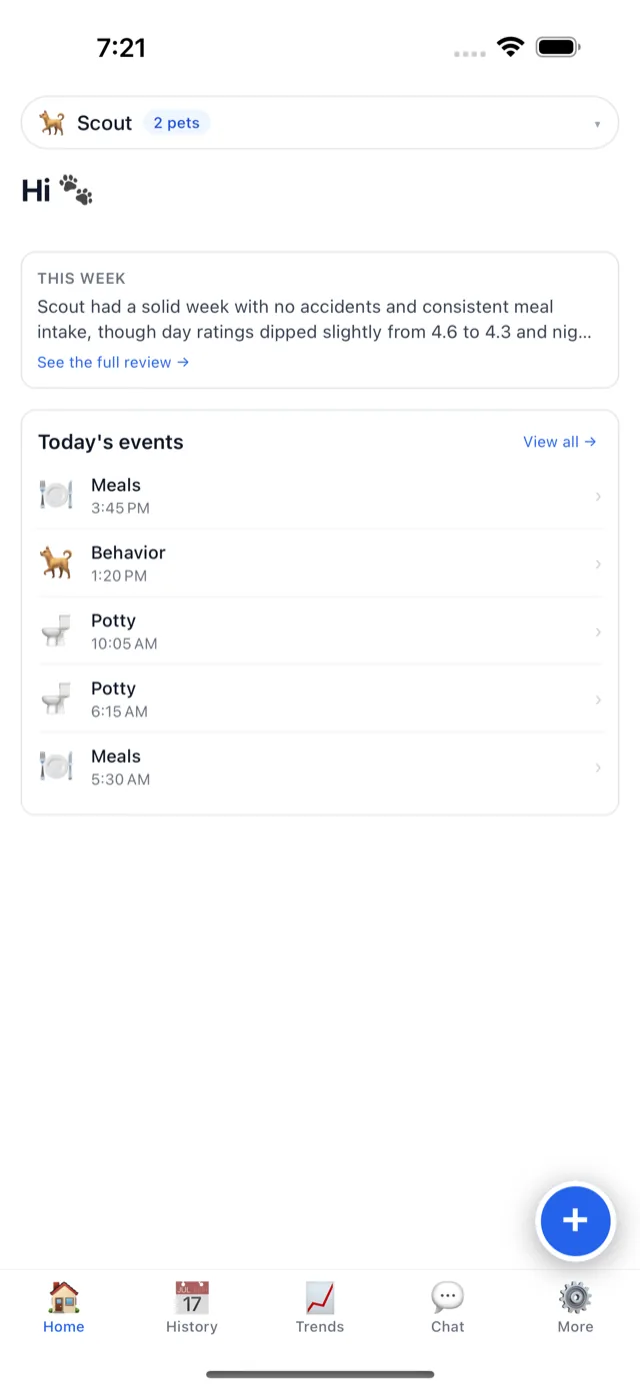
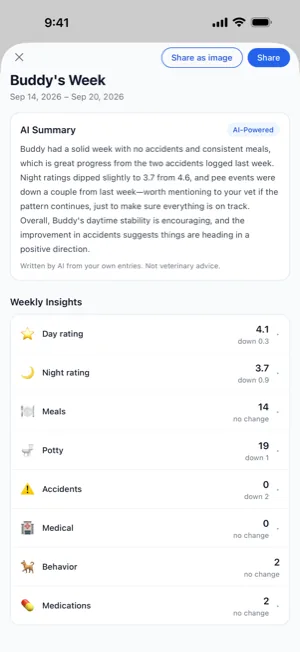
Screens shown are from the iPhone app, with our sample pet, Buddy. The Android app and the web app show the same card and the same review.
Finding it
- Open Home and pick the pet at the top. The card headed This week shows the first two lines of the summary.
- Tap See the full review. It opens as “Buddy’s Week”, with its dates.
- Tap a row to open it up — Meals into breakfast, lunch, dinner, other and refused, for example.
- Share it, if you like. Share sends the week as text, every row included. Share as image makes a picture of the summary with your pet’s first name and the dates, labelled as an AI-powered summary.
The week it reads
The review covers the most recent Monday-to-Sunday week that has ended, compared with the week before it — on a Wednesday, last week, not “the last seven days”. So the week does not slide under you between one look and the next, and a week you are still in never shows up half-logged. It is picked on your own calendar, in the time zone saved on your account.
The numbers are never stored. They are counted afresh from every entry anyone in your household made for that pet each time the review loads, so an entry you back-date to last Thursday, or correct, shows up in them.
What the numbers are
| Row | What it counts | Opens into |
|---|---|---|
| Day rating | The average of the week’s day ratings, out of 5 | How many days were rated |
| Night rating | The same for the night ratings | How many nights were rated |
| Meals | Every meal logged | Breakfast, lunch, dinner, other, and refused (a meal logged with None eaten) |
| Potty | Every potty break logged | Pee, poop, and how many were accidents |
| Accidents | Only the potty breaks you marked as an accident | Pee and poop |
| Medical | Medical entries | Mild, moderate and severe |
| Behavior | Behavior entries | — |
| Medications | Medications on the pet’s list at any point in the week | How many started, and how many stopped |
Beside each number is its change from the week before, in plain grey words: up 2, down 0.3, no change. There is no green for “better” or red for “worse”, because whether a change is good news is not something a count can know. A week with no ratings shows a dash, not a zero: nothing rated and a bad week are different things.
Potty and Accidents are separate on purpose: in Buddy’s week above, 19 potty breaks and no accidents, against two the week before. And Medications is the list, not the doses, so it cannot tell you whether a dose was missed.
The summary, and what the AI is given
Above the numbers sits a summary of two to four sentences, written by an AI model. It is asked for the changes, streaks and timing worth noticing, in words that are “warm and factual, never alarmist”, in the language your account is set to (English or Spanish). This is everything it is given:
- Your pet’s name, and the numbers above for both weeks, breakdowns included.
- Up to three of the week’s medical entries, shortened: the words you wrote on them.
- The medications your pet is on now: their names and the dates they started.
Nothing else: no photos, no notes from other kinds of entry, no email address, nothing from another household. The model runs on Amazon Bedrock, inside WagWatch’s own AWS account, and what it reads is not used to train any model. The privacy policy has the detail.
Opening Home in a new week is enough to have it written. It is kept for the week, and rewritten a few times at most if late entries change the numbers — so if the words and the numbers ever disagree, trust the numbers.
What the AI is told never to do
Every AI feature in WagWatch — the assistant, the vet visit report and this summary — gets the same rules, and they override everything else it is told:
- Describe what your household logged. Never say what your pet “has”, and never name a condition as the cause of anything.
- No doses. Never suggest a dose, a change to one, a skipped or doubled one, or any human medicine.
- Never say it is safe to wait, to skip a vet visit, or to handle something at home.
- No verdicts of its own. Do not call what you logged normal, expected, fine or a good sign, and report your notes as your own words.
- Emergencies first. If anything logged suggests one, such as a seizure, a collapse, trouble breathing, a swollen belly, not peeing or a possible poisoning, say first that you should contact your vet or an emergency clinic now.
- Point to the vet with the facts. When a pattern looks worth attention, suggest mentioning it to your vet, with the dates and counts from the log — which a share link or a PDF from History puts in front of them.
Under the summary in the full review, every time, is a line saying it was written by AI from your own entries, and that it is not advice from a vet.
These are instructions to a language model, not a filter, and models do not follow instructions perfectly. The summary in the picture above was written before the no-verdict rule was added on September 26, and it calls Buddy’s week “great progress” and “encouraging” — the kind of judgment the model is now told to leave to your vet. We would rather say so than show you a tidier screenshot.
What it cannot do
- It only knows what was logged. A day with no entries is a blank, not a quiet day, and the AI is told exactly that.
- A thin week makes a thin review. Three entries give three entries’ worth of summary; an empty week says Nothing logged this week yet.
- It cannot tell you what is wrong — or that nothing is. It sees counts and a few short notes, never your pet. Whether a change matters is a question for someone who can examine the animal.
- It is not an alarm. It reads a week that has already ended. If something is happening now, call your vet or an emergency clinic.
- It compares two weeks, no more. A slow change over months is easier to see on Trends.
- Sometimes there are no words. If the model is unavailable, the review opens with No written summary this week. The numbers below are complete. — and they are.
The Monday digest
The same week, in your inbox. Every Monday at 15:00 UTC (morning in the Americas, afternoon in Europe), WagWatch emails each member of a Premium household about the Monday-to-Sunday week that just ended — the same week the review in the app covers. For each pet:
- the average day rating, and whether it went up or down from the week before;
- a line of counts: meals, potty breaks, accidents, medical, behavior and night notes, leaving out any that were zero;
- up to three of the week’s medical notes.
At the top, when there is one, is This week’s insights: one AI paragraph for the whole household, written under the same rules as the review’s summary, with the same line under it saying it was written by AI; if the model is unavailable, the email goes out without it. A week with no entries still gets its email, saying so — worth knowing if you thought someone else was logging.
Each member gets it in their own language, English or Spanish, and can turn it off for themselves with the Weekly digest email switch under More, then WagWatch Premium, on the phone or the web. The review on Home stays either way.
Premium, and the free plan
The Weekly Review and the Monday digest are part of Premium — the numbers as well as the summary. On the free plan, the This week card on Home says that the Weekly Review is part of Premium, and there is no Monday email. The entries the review counts are all still in your History, which on the free plan goes back 60 days. The 14-day free trial includes both.
To see one first, tap Explore the app on the sign-in screen. Its sample pet has a sample Weekly Review, counted by the same code a real review uses. Its summary is labelled Sample and built from the numbers in plain sentences, with no AI: an AI paragraph about a pet that does not exist would read as an insight it is not.
Questions
Why does it show last week instead of this week?
Because a week in progress is half-logged. On a Wednesday this week has barely begun, and comparing it with the whole of last week would make every count look like a drop. The review waits until the week has ended, on your own calendar.
Does everyone in my household see the same review?
Yes: the same numbers, counted from every entry anyone logged for that pet, without saying who logged what. Someone who uses WagWatch in Spanish reads the summary in Spanish.
What if the summary says something that looks wrong?
Trust the numbers under it, and your own eyes. The summary is a reading of those numbers, and a model can misread them. If it says something it should not, tell us at support@wagwatch.app.
Not a substitute for your vet
WagWatch is a tracking and logging tool, not a veterinary service. Its job is to help you bring a clear, accurate history to the people who care for your pet professionally.
Log it in WagWatch
Log a week — rate the days and nights, flag the accidents, log a refused meal as None — and open Home the Monday after. For what to bring besides the log, see what to write down before a vet appointment. The help pages list what Premium includes and what the AI features send, and where, and shared households shows how everyone’s entries land in one record. More posts are on the blog.


Free to use every day. Premium adds the Weekly Review and the Monday digest, the full history, every pet and the AI assistant — $3.99 a month or $24.99 a year, 14-day free trial.